


Choosing the best mouse for CAD design boosts precision and comfort during long work sessions. A good mouse supports smooth navigation and accurate control in complex 3D environments.
CAD design demands tools that combine accuracy, comfort, and ease of use. A high-quality mouse reduces hand strain and improves productivity. Features like adjustable DPI, programmable buttons, and ergonomic shapes help designers work efficiently. Wireless options add flexibility, while wired mice offer stable connections.
Models like the Logitech MX Master 3S and 3Dconnexion CadMouse Pro Wireless cater specifically to CAD needs. Trackballs and vertical mice provide alternatives for different grip styles. Considering compatibility with your computer system is also important. This guide covers top mice that meet CAD designers’ requirements, helping you pick the right one for precise and comfortable design work.
Logitech Mx Master 3s Wireless Mouse

The Logitech MX Master 3S Wireless Mouse Standard Edition is ideal for professionals, creatives, and tech enthusiasts who demand precision, comfort, and seamless connectivity in their daily workflow. If you work extensively on Windows, Linux, or Chrome platforms and value ergonomic design combined with advanced features like ultra-fast scrolling and customizable buttons, this mouse is designed for you.
Pros:
- Ultra-fast scrolling enhances productivity by allowing quick navigation through long documents and web pages.
- Ergonomic design reduces strain during extended use, promoting comfort and preventing fatigue.
- 8K DPI precision ensures smooth and accurate tracking on various surfaces, including glass.
- Quiet clicks provide a distraction-free working environment.
- Multiple connectivity options with USB-C, Bluetooth, and the Logi Bolt USB receiver offer flexibility and reliability.
- Compact dimensions and lightweight make it portable without sacrificing performance.
Cons:
- Premium price point may be a barrier for budget-conscious buyers.
- Advanced features might have a learning curve for casual users.
The Logitech MX Master 3S combines a sleek graphite finish with a thoughtfully engineered structure to deliver an exceptional user experience. Its height of approximately 0.04 inches, width of 3.32 inches, and length of 4.92 inches provide a comfortable grip that fits naturally in the hand. This ergonomic build, alongside the ultra-fast scrolling feature, allows users to navigate through complex tasks and large volumes of data efficiently. The mouse’s capability to track accurately on glass surfaces and its high 8K DPI sensitivity make it suitable for designers, programmers, and anyone who requires pinpoint control.
Connectivity is another strong suit of the MX Master 3S. It supports multiple connection methods, including Bluetooth, USB-C, and the secure Logi Bolt USB receiver, ensuring compatibility across various devices and operating systems such as Windows, Linux, and Chrome. The inclusion of quiet clicks improves concentration in shared workspaces, while the lightweight design enhances portability without compromising durability. Overall, this mouse caters to users seeking a balance between performance, comfort, and versatility.
To buy this product, click here.
Cadmouse Pro Wireless Mouse

The 3Dconnexion CadMouse Pro Wireless Mouse is the ideal tool for professional designers, engineers, and CAD users who require precision and efficiency in their work. This mouse is tailored for those who spend significant time on computer-aided design (CAD) applications and need a device that can keep up with their demanding requirements.
Pros:
- Ergonomic design minimizes strain during long hours of use.
- High precision with dedicated middle mouse button for CAD applications.
- Customizable buttons for enhanced productivity.
- Wireless connectivity ensures a clutter-free workspace.
Cons:
- Relatively higher price point compared to standard mice.
- Specific design may not be suitable for non-CAD users.
The 3Dconnexion CadMouse Pro Wireless Mouse features an ergonomic design that is specifically crafted to reduce hand fatigue and wrist strain. This is particularly beneficial for users who engage in extended sessions of CAD work, providing comfort and support that aids in maintaining productivity. The mouse also boasts a dedicated middle mouse button, which is a significant advantage for CAD professionals who frequently rely on this feature for their work.
Additionally, this mouse offers customizable buttons that can be programmed to perform specific functions, further enhancing user efficiency by tailoring the mouse to individual workflow needs. With its wireless connectivity, users can enjoy a tidy workspace without the hindrance of cables, making it not only a high-performance tool but also a practical choice for a professional setting. The 3Dconnexion CadMouse Pro Wireless Mouse is a powerful companion for those who demand precision and reliability in their design endeavors.
To buy this product, click here.
Nulea M501 Wireless Trackball Mouse

The Nulea M501 Wireless Trackball Mouse is ideal for users who seek an ergonomic and rechargeable pointing device that minimizes wrist strain. It is perfect for professionals, graphic designers, and anyone who works long hours on a PC, laptop, or Mac and values precise and smooth tracking with easy thumb control. Those who need to switch seamlessly between multiple devices will also benefit from its 3 device connection capability.
Pros:
- Ergonomic design reduces wrist fatigue and improves comfort during extended use.
- Rechargeable battery eliminates the need for disposable batteries, making it eco-friendly and cost-effective.
- Easy thumb control for precise and smooth cursor movement without excessive hand motion.
- Multi-device connectivity via Bluetooth or USB receiver supports up to 3 devices, enhancing productivity.
- Wide compatibility with PC, laptop, Mac, and Windows ensures versatility across platforms.
- Compact dimensions and lightweight design make it portable and convenient.
Cons:
- Trackball learning curve may be challenging for users accustomed to traditional mice.
- Limited color options with the model available only in A-Red.
- Small height dimension may affect grip preference for some users.
The Nulea M501 Wireless Trackball Mouse features a thoughtfully crafted ergonomic design that emphasizes thumb control, allowing users to navigate with minimal wrist movement. This reduces the risk of repetitive strain injuries common among heavy mouse users. Its precise and smooth tracking capability ensures accurate cursor control, which is particularly beneficial for detailed tasks such as graphic design or data analysis. The rechargeable battery supports extended use without interruption, and the inclusion of both Bluetooth and USB receiver connectivity provides flexibility to connect with various devices effortlessly.
Supporting up to 3 device connections, the M501 enables seamless switching between a PC, laptop, and Mac, enhancing workflow efficiency. Its lightweight and compact dimensions make it an excellent choice for users who require portability without sacrificing functionality. Overall, this trackball mouse is a smart investment for anyone seeking comfort, precision, and multi-device versatility in a single ergonomic device.
To buy this product, click here.
Logitech M720 Triathlon Wireless Mouse

The Logitech M720 Triathlon Wireless Mouse is ideal for professionals, students, and multitaskers who require a reliable and versatile pointing device compatible with multiple platforms such as Laptop, PC, Mac, and iPadOS. If you are someone who values seamless switching between devices, enhanced productivity, and long battery life, this mouse is designed to meet your needs efficiently.
Pros:
- Supports easy device switching via Bluetooth or USB Unifying Receiver
- Features 6 programmable buttons for customized shortcuts
- Offers precise 1000 DPI tracking for smooth cursor control
- Long-lasting 2-year battery life reduces maintenance
- Ergonomic design fits comfortably during extended use
Cons:
- May feel slightly bulky for users preferring ultra-compact mice
- Limited color option (only available in black)
- Not optimized for gaming with high DPI requirements
The Logitech M720 Triathlon Wireless Mouse stands out with its capability to connect to up to three devices and switch between them effortlessly with the touch of a button. This feature is particularly beneficial for users who juggle between multiple computers or tablets, boosting workflow efficiency without the need for multiple mice. The integration of both Bluetooth and USB Unifying Receiver connectivity options ensures compatibility with a wide range of devices, offering flexibility and convenience.
Additionally, the mouse’s 6 programmable buttons allow users to customize commands and shortcuts, significantly speeding up repetitive tasks and enhancing productivity. Its 1000 DPI sensor delivers precise and smooth cursor movement suitable for everyday office work and browsing. The ergonomic design supports comfortable use for long hours, complemented by an impressive 2-year battery life that minimizes interruptions and maintenance. Overall, the Logitech M720 is a reliable, efficient, and user-friendly wireless mouse tailored for multitasking professionals and casual users alike.
To buy this product, click here.
Redragon M913 Impact Elite Wireless Gaming Mouse
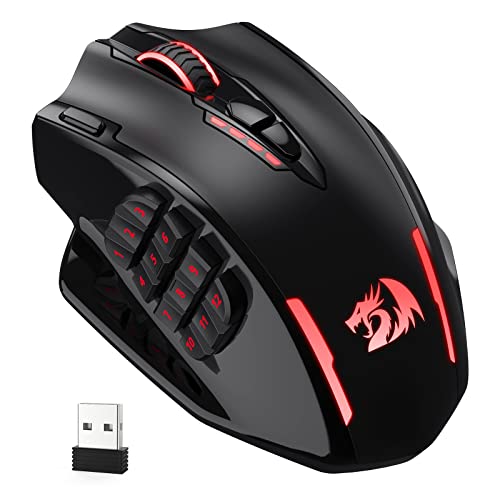
The Redragon M913 Impact Elite Wireless Gaming Mouse is ideal for avid gamers, especially those who engage in MMO and FPS games and require high precision, customizable controls, and long-lasting battery life. This mouse suits users who want the flexibility of wired and wireless connectivity combined with advanced features like programmable buttons and RGB lighting to enhance their gaming experience.
Pros:
- Up to 16000 DPI for ultra-precise tracking and responsiveness
- 16 programmable buttons including 12 side buttons for quick access to game commands
- Wireless and wired modes for versatile usage and uninterrupted gameplay
- Long-lasting 45-hour battery life on a single charge
- Pro optical sensor ensures accurate and smooth cursor movements
- Customizable RGB lighting to personalize your setup
Cons:
- Relatively large size may not be comfortable for users with smaller hands
- Complex setup for programming all 16 buttons might require time to master
- Black color may show fingerprints and smudges easily
The Redragon M913 Impact Elite stands out with its impressive 16000 DPI Pro Optical Sensor, delivering pinpoint accuracy essential for competitive gaming. Whether wired or wireless, this mouse offers seamless connectivity, allowing gamers to switch modes without interruption. Its ergonomic design supports extended gaming sessions, while the extensive 16 programmable buttons enable users to customize controls to their playstyle, enhancing efficiency and reaction time during intense battles.
Another notable feature is its robust 45-hour battery life, which reduces downtime and keeps gamers in the action longer. Additionally, the vibrant RGB lighting allows for aesthetic personalization, making the mouse visually appealing and matching any gaming setup. The combination of these features makes the Redragon M913 a powerful and versatile tool for gamers seeking precision, customization, and reliability.
To buy this product, click here.
Logitech G305 Lightspeed Wireless Gaming Mouse

The Logitech G305 LIGHTSPEED Wireless Gaming Mouse is ideal for gamers and professionals who seek a reliable, high-performance mouse without the hassle of wires. If you want a lightweight, precise device that delivers exceptional responsiveness and long battery life, this mouse is perfect for you. Its compact design and programmable buttons make it suitable for both competitive gaming and everyday productivity on PC or Mac.
Pros:
- Hero 12K sensor with up to 12,000 DPI for precise tracking.
- LIGHTSPEED wireless technology ensures lag-free, high-speed connectivity.
- Lightweight design at just 0.21 pounds for comfortable extended use.
- 6 programmable buttons customizable for enhanced control.
- Impressive 250-hour battery life on a single AA battery.
- On-board memory to save personalized settings anywhere.
- Compatible with both PC and Mac.
Cons:
- No RGB lighting for those who prefer visual customization.
- Relies on a single AA battery instead of rechargeable options.
- Smaller size may not suit users with large hands.
The Logitech G305 features the advanced Hero 12K sensor, delivering exceptional accuracy and responsiveness with sensitivity up to 12,000 DPI. This makes it ideal for fast-paced gaming where precision is critical. Its LIGHTSPEED wireless technology offers a stable connection with virtually no latency, so users can enjoy seamless gameplay or work without interruptions caused by cables or connectivity issues.
Designed to be lightweight and ergonomic, the mouse weighs only 0.21 pounds, reducing hand fatigue during long sessions. The 6 programmable buttons allow users to customize commands and macros to fit their specific needs, enhancing productivity and gaming efficiency. Additionally, the impressive 250-hour battery life means fewer interruptions and less frequent battery changes, while the on-board memory stores your settings for use on any compatible device, adding flexibility and convenience.
To buy this product, click here.
Protoarc Ergonomic Mouse

The ProtoArc Ergonomic Mouse EM11 NL is ideal for professionals and everyday users who seek comfort and efficiency in their computer accessories. Those who spend long hours working on a PC, laptop, or Mac will benefit greatly from its ergonomic design. It is perfect for individuals looking to reduce wrist strain while maintaining high productivity across multiple devices.
Pros:
- Ergonomic vertical design reduces wrist fatigue and promotes a natural hand position.
- Bluetooth rechargeable wireless connectivity eliminates the hassle of cables and frequent battery replacements.
- 3 multi-device connectivity allows seamless switching between different computers or laptops.
- Compatibility with Windows and Mac OS ensures versatile use across various systems.
- Compact and lightweight with dimensions designed for easy portability.
Cons:
- May require an adjustment period for users unfamiliar with vertical mouse designs.
- Limited color options available (only black).
- Smaller size might not suit users with larger hands.
The ProtoArc EM11 NL is engineered to offer an ergonomic solution through its vertical mouse shape, which encourages a natural hand posture. This design significantly reduces the risk of repetitive strain injuries like carpal tunnel syndrome, making it a smart choice for users who spend extensive time at their computers. Additionally, the mouse’s Bluetooth rechargeable wireless feature provides convenience and environmental benefits by eliminating disposable batteries.
Another standout feature is its ability to connect with up to three devices, allowing users to effortlessly switch between a desktop, laptop, or other compatible devices. This multi-device connectivity enhances workflow efficiency without the need for multiple mice. With support for both Windows and Mac OS, the ProtoArc EM11 NL offers a versatile and reliable user experience. Its compact size and lightweight build make it a practical accessory for on-the-go professionals as well.
To buy this product, click here.
Tecknet Bluetooth Mouse

The TECKNET Bluetooth Mouse is ideal for professionals, students, and casual users who need a reliable, portable, and versatile wireless mouse. If you are someone who values silent clicks, long battery life, and adjustable sensitivity for different tasks, this mouse is designed to enhance your computing experience without interruptions.
Pros:
- Dual connectivity with Bluetooth 5.0 and 2.4G USB-A receiver for flexible use
- Silent click technology ensures noise-free operation, perfect for quiet environments
- 6-level adjustable 4000 DPI for precise cursor control tailored to your needs
- Portable and lightweight design makes it easy to carry and use on the go
- Long-lasting 18 months battery life reduces the hassle of frequent charging
- 6 buttons provide enhanced functionality and convenience
Cons:
- May require manual DPI adjustment for different tasks
- Black color may show fingerprints more easily
- Compact size might not be comfortable for users with larger hands
The TECKNET Bluetooth Mouse combines modern connectivity options with user-friendly features. Its ability to switch seamlessly between Bluetooth 5.0 and a 2.4G USB-A receiver allows users to connect to multiple devices, making it a versatile choice for laptops, desktops, and even tablets. The silent click technology is especially beneficial for quiet workspaces, ensuring you won’t disturb others while working or studying.
With 6-level adjustable DPI settings reaching up to 4000 DPI, users can customize the mouse sensitivity for precise control whether they are editing documents, browsing the web, or playing games. Additionally, the mouse’s compact and lightweight design enhances portability, making it a great companion for those who travel frequently. The exceptional 18 months battery life means less downtime and more productivity, giving users peace of mind that their mouse will keep up with their demanding schedules.
To buy this product, click here.
Xbg B15pro Wireless Bluetooth Mouse

The XBG B15pro Wireless Bluetooth Mouse is ideal for professionals and tech-savvy users who need a versatile and reliable pointing device for their laptop, PC, or tablet. If you frequently switch between multiple devices or work in an office environment where silent clicking is essential, this mouse offers a perfect blend of functionality and comfort. Its ergonomic design and multi-mode connectivity make it a great choice for anyone seeking efficiency and ease of use in daily computing tasks.
Pros:
- Supports Bluetooth 5.0/4.0 and 2.4G Tri-Mode for seamless connectivity across devices.
- Type-C rechargeable battery ensures quick and convenient charging without frequent replacements.
- LED screen display provides real-time battery status and connectivity information.
- Ergonomic silent click design reduces noise, making it ideal for office and quiet environments.
- Compact and lightweight with dimensions of 4.55 x 2.83 inches and weighing only 0.165 pounds, enhancing portability.
Cons:
- Limited color options with only the B15 pro-black variant available.
- May require initial pairing setup for users unfamiliar with multi-mode Bluetooth devices.
The XBG B15pro Wireless Bluetooth Mouse excels in offering flexible connectivity options, thanks to its support for Bluetooth 5.0, Bluetooth 4.0, and 2.4G wireless modes. This tri-mode capability allows users to effortlessly switch between different devices, enhancing productivity for multitasking professionals. The inclusion of a Type-C rechargeable battery not only reduces environmental waste but also guarantees rapid power top-ups, minimizing downtime during work sessions.
Additionally, the ergonomic design ensures comfortable use over extended periods, while the silent click feature promotes a quieter working environment, reducing distractions in shared spaces. The LED screen display is a practical touch, keeping users informed about battery life and connectivity status at a glance, which helps avoid unexpected interruptions. Overall, this mouse is crafted to meet the demands of modern users who prioritize both performance and comfort in their daily computing tools.
To buy this product, click here.
Cadmouse Compact Wireless

The 3Dconnexion CadMouse Compact Wireless is an ideal choice for professional designers, engineers, and architects who require precision and comfort in their daily CAD (Computer-Aided Design) work. Those who seek a compact, ergonomic, and wireless mouse designed specifically to enhance productivity and reduce wrist strain will find this device perfectly suited to their needs.
Pros:
- Ergonomic design tailored for comfortable extended use
- Wireless connectivity offering freedom of movement and clutter-free workspace
- Compact size making it highly portable and space-efficient
- High precision sensor optimized for CAD applications
- Durable build with premium materials from a trusted brand
Cons:
- May have a learning curve for users new to specialized CAD mice
- Premium price point compared to standard wireless mice
- Limited color options (available only in black)
The 3Dconnexion CadMouse Compact Wireless stands out with its thoughtfully engineered compact dimensions (Height: 0.1 Inches, Width: 2.6 Inches, Length: 4.3 Inches) and lightweight design weighing just 0.24 pounds, making it comfortable to use over long periods without causing fatigue. The wireless feature eliminates cable clutter, providing greater flexibility in workspace setup and allowing users to focus more on their creative tasks.
Equipped with a high-precision sensor, this mouse delivers exceptional accuracy essential for detailed CAD work, ensuring smooth navigation and control. The ergonomic shape supports natural hand posture, reducing the risk of repetitive strain injuries. Overall, the 3Dconnexion CadMouse Compact Wireless combines functionality, comfort, and portability, making it a valuable tool for professionals who demand efficiency and reliability in their workflow.
To buy this product, click here.
Frequently Asked Questions
What Makes A Mouse Ideal For Cad Design?
A CAD mouse offers precision, ergonomic comfort, and customizable buttons. It improves workflow and reduces hand fatigue during long design sessions. High DPI and smooth tracking help in detailed, accurate work essential for CAD professionals.
How Does Logitech Mx Master 3s Benefit Cad Users?
The MX Master 3S features ultra-fast scrolling, 8K DPI, and ergonomic design. Its quiet clicks and multi-device connectivity boost productivity. It tracks smoothly on glass, ideal for CAD environments requiring precision and comfort.
Why Choose 3dconnexion Cadmouse Pro Wireless For Cad?
CadMouse Pro Wireless is tailored for CAD with dedicated buttons and high precision. It supports wireless freedom and ergonomic handling. Its features simplify complex design commands and improve accuracy during detailed CAD tasks.
Is A Trackball Mouse Like Nulea M501 Good For Cad?
Trackball mice offer precise control without moving the whole mouse. Nulea M501’s ergonomic design reduces wrist strain. It supports multi-device connection, making it versatile for CAD professionals needing comfort and accuracy.
Can Gaming Mice Like Redragon M913 Help In Cad Design?
Gaming mice like Redragon M913 provide high DPI and programmable buttons. These features help customize CAD workflows. Its long battery life and precision sensors benefit users needing fast response and accuracy in design tasks.
What Is The Advantage Of Multi-device Connectivity In Cad Mice?
Multi-device connectivity lets you switch between PC, laptop, and tablet easily. It enhances workflow flexibility and saves time. Devices like Logitech M720 Triathlon support this, making CAD work seamless across platforms.
Conclusion
Choosing the best mouse for CAD design depends on your work style and needs. Each mouse on this list offers unique features. Some focus on comfort, like the Logitech MX Master 3S or ProtoArc Ergonomic Mouse. Others provide high precision, such as the 3Dconnexion CadMouse Pro Wireless.
Wireless options offer freedom of movement, while wired models ensure a stable connection. Battery life and connectivity types vary, so pick what suits your setup. Programmable buttons can speed up common tasks. DPI settings affect cursor speed and accuracy. Remember, a good mouse can reduce hand strain during long design sessions.
Try to find a balance between comfort, precision, and functionality. This will help improve your CAD workflow and make your work easier. Use this guide to select a mouse that fits your budget and design needs perfectly. Your ideal CAD mouse is waiting to help you create with ease.


