


Are you ready to upgrade your mechanical keyboard experience? The Glorious Panda Unlubed switch might be exactly what you’ve been searching for.
Known for its unique feel and satisfying sound, this switch offers something special for your fingertips. Whether you’re typing away or gaming hard, understanding what makes the Glorious Panda Unlubed stand out can change how you connect with your keyboard. Keep reading to discover why this switch could be the missing piece in your setup.
Switch Specifications:
| Switch Type: | Tactile |
| Mount Type: | Plate Mount |
| Travel Distance: | 2mm Actuation | 4mm Total |
| Price: | $19.99 (36 pieces – Unlubed) $34.99 (36 pieces – Lubed) |

Glorious Panda Unlubed Switch Features
The Glorious Panda Unlubed switch is popular for its unique feel. It offers a smooth and tactile experience without lubrication. This switch suits many mechanical keyboard users.Below, we explore the key features of the Glorious Panda Unlubed switch. Learn about its design, materials, and feedback traits.
Switch Design And Build
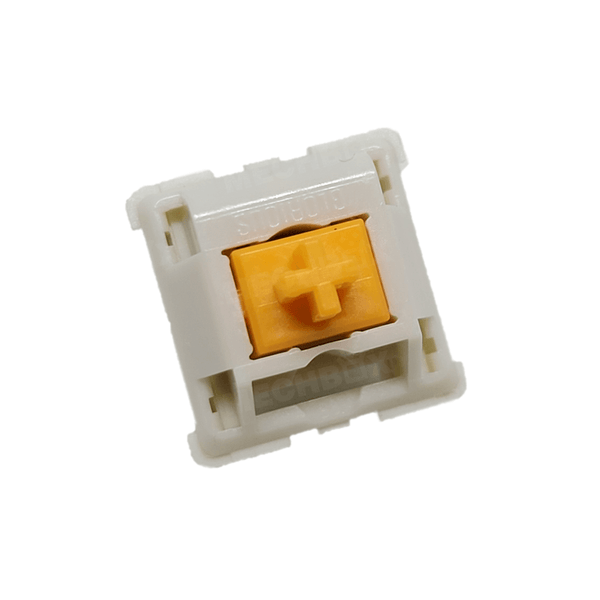
The switch has a sturdy design with careful attention to detail. It uses a clear housing to show the internal parts. The build quality ensures durability and consistent performance.
- Transparent top housing for visual appeal
- Solid bottom housing for stability
- Gold-plated contacts for better conductivity
- Standard MX-style pin layout for compatibility
Stem And Housing Materials
| Component | Material |
|---|---|
| Stem | POM (Polyoxymethylene) |
| Top Housing | Polycarbonate |
| Bottom Housing | Polycarbonate |
| Spring | Stainless Steel |
Tactile Feedback Characteristics
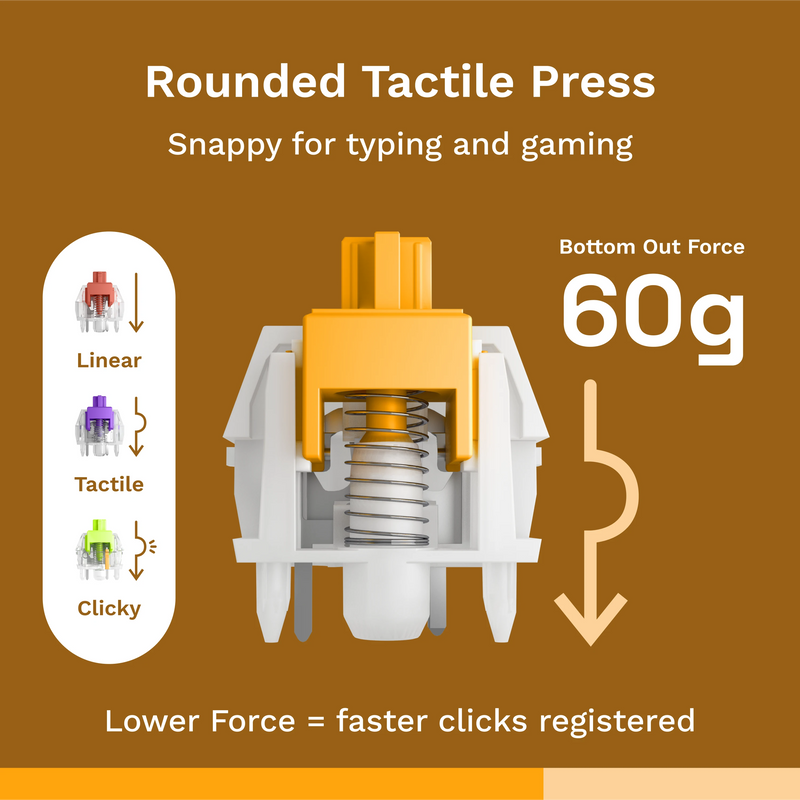
The tactile bump is strong and sharp. It offers clear feedback without being noisy. The switch feels smooth from top to bottom.
- Noticeable tactile bump near the top
- Light spring force for quick presses
- Minimal scratchiness without lubrication
- Quiet sound profile compared to clicky switches
Why Choose Unlubed Switches
Unlubed switches offer a unique typing feel for keyboard enthusiasts. They provide a different experience compared to their lubed counterparts.
Understanding the benefits of unlubed switches can help you decide if they’re right for your setup.
Sound Profile Differences
Unlubed switches often produce a distinct sound. This appeals to many users who enjoy auditory feedback.
- Crisp and clear clicks
- More pronounced sound
- Original switch acoustics
Tactile Experience Without Lubrication
Without lubrication, the tactile feedback is more noticeable. This can enhance the typing feel for some users.
Unlubed switches provide a direct connection with each keystroke.
Maintenance And Longevity
Unlubed switches might require less maintenance over time. They avoid issues related to lubricant wear.
| Feature | Unlubed | Lubed |
|---|---|---|
| Sound Profile | Louder | Softer |
| Tactile Feedback | Sharper | Smoother |
| Maintenance | Less frequent | More frequent |
Silent Mechanical Switches Explained
Silent mechanical switches are designed to reduce the noise when typing. They keep the feel of a mechanical keyboard but with less sound. Glorious Panda Unlubed switches are a popular example. They offer smooth typing and quieter clicks.
Noise Reduction Mechanisms
Silent switches use special parts to lower noise. Soft material inside the switch absorbs the sound. These switches often have dampeners that stop the metal from hitting hard surfaces. This cuts down the loud “click” sound.
- Rubber or silicone pads reduce impact noise
- Lubrication lowers friction and sound
- Design changes soften the switch press
Comparison With Other Silent Switches
Glorious Panda Unlubed switches are quieter than many regular switches. They are not as silent as some with heavy dampeners. bCompared to other silent switches, they have a smoother feel but can be a bit louder without lubrication.
| Feature | Glorious Panda Unlubed | Typical Silent Switch |
|---|---|---|
| Noise Level | Moderate | Low |
| Smoothness | High | Medium |
| Need for Lubrication | Recommended | Optional |
Common Applications
Silent switches are good for quiet places like offices and libraries. They help reduce noise distractions. They are also popular for home use, especially in shared rooms. People can type without disturbing others.
- Office work where quiet is needed
- Home use in shared spaces
- Streaming or recording to avoid keyboard noise
Glorious Panda Unlubed Sound Test
The Glorious Panda Unlubed switch is popular for its unique sound profile. This test explores how the switch sounds while typing. We recorded the typing sounds to give you a clear idea of what to expect from these switches.
Recording Setup
The sound was recorded using a high-quality microphone placed close to the keyboard. The room was quiet to avoid background noise. The keyboard was mounted on a desk with a soft mat to reduce vibrations. No additional sound effects were added.
Typing Sound Samples
Typing on the Glorious Panda Unlubed switches produces a soft yet tactile sound. The noise level is moderate and not too loud. The sound has a gentle click but is smoother than lubed switches. It provides clear feedback without harshness.
- Soft tactile bump with a mild click
- Minimal scratchy or pinging noises
- Clear but not loud typing sound
User Impressions
Users say the switches feel crisp and responsive. The sound is satisfying without being distracting. Many like the natural feel since no lubricant changes the switch’s character. The quiet click suits office or home use.
- Crisp and tactile typing feel
- Quiet enough for shared spaces
- Feels natural and unaltered
Switch Modding Tips
Modding your Glorious Panda switches can change their feel and sound. Small tweaks improve your typing experience. Try different mods carefully to find what suits your style best. This guide covers key tips for switch modding.
Lubrication Techniques
Lubricating switch parts reduces friction and noise. Use a thin layer on sliders and springs for smooth keypresses.
- Apply lube sparingly to avoid sticky keys
- Use a fine brush for even coverage
- Choose lubes designed for mechanical switches
- Focus on slider rails and spring coils
- Test switches after lubing to check feel
Spring Swaps And Their Effects
Changing springs affects how hard or soft keys feel. Heavier springs need more force; lighter springs are easier to press.
| Spring Type | Weight (g) | Effect |
| Stock | 45 | Balanced feel and sound |
| Heavier | 60+ | Stronger resistance, louder sound |
| Lighter | 35 | Smoother, quieter keystrokes |
Combining Mods For Silence
Use multiple mods together to reduce noise. Lubricate parts and add dampening materials to lower sound levels.
- Lubricate sliders and springs well
- Swap springs for lighter, quieter ones
- Add foam inside the keyboard case
- Use silicone or rubber o-rings under keycaps
Choosing Keyboards For Glorious Panda
Glorious Panda switches are popular for their tactile feel and unique sound. Picking the right keyboard for them is important. This guide helps you understand what to look for.
Consider factors like compatibility, build options, and how keycaps affect the typing experience. These points will help you get the best from your Glorious Panda switches.
Compatibility Considerations
Glorious Panda switches use a standard MX stem. They fit most mechanical keyboards with MX-compatible sockets. Make sure the keyboard supports hot-swappable switches if you want easy installation.
- Check if the keyboard supports 3-pin or 5-pin switches.
- Confirm the switch housing fits the keyboard’s plate or PCB.
- Verify the keyboard layout matches your needs (60%, TKL, full size).
- Consider the keyboard’s case material for sound and feel.
Plate And Pcb Options
Plate and PCB choices affect switch stability and sound. Some materials change how Glorious Panda switches feel when typing.
| Plate Material | Effect on Sound | Effect on Feel |
|---|---|---|
| Aluminum | Brighter, sharper sound | Firm and stable |
| Polycarbonate | Softer, muted sound | Flexible and cushioned |
| Brass | Deep, rich sound | Heavy and solid |
| Steel | Clear and loud | Very firm and heavy |
Keycap Influence On Sound
Keycaps change the typing sound and feel of Glorious Panda switches. Different materials and shapes create distinct sounds.
- ABS keycaps tend to sound higher-pitched and sharper.
- PBT keycaps give a thicker, deeper sound.
- Thicker keycaps can soften the sharpness of the switch click.
- Profile shapes (like SA or Cherry) affect finger comfort and sound tone.
Frequently Asked Questions
What Is The Glorious Panda Unlubed Keyboard Switch?
The Glorious Panda Unlubed is a tactile mechanical switch without lubrication. It offers a distinct, crisp bump and satisfying feedback ideal for typing and gaming enthusiasts seeking natural switch feel.
How Does Glorious Panda Unlubed Differ From Lubed Switches?
Unlike lubed switches, it has no added lubricant, resulting in a sharper tactile bump. This enhances feedback but may produce slightly more noise compared to lubed variants.
Are Glorious Panda Unlubed Switches Good For Gaming?
Yes, they provide precise tactile feedback, aiding quick key recognition. Their responsiveness benefits fast-paced gaming while maintaining satisfying typing experience without mushiness.
Can I Use Glorious Panda Unlubed Switches For Daily Typing?
Absolutely, their tactile bump improves typing accuracy and comfort. The unlubed design offers a natural feel preferred by many typists for long sessions.
Conclusion
Glorious Panda Unlubed offers a smooth and quiet typing feel. It suits those who want a soft, tactile experience. The switches respond well to gentle presses. They help reduce finger fatigue during long use. Many users enjoy their light and consistent feedback.
This makes typing more comfortable and enjoyable. Choosing these switches can improve your keyboard setup. Give them a try for a quieter, softer touch. You might find your typing speed and comfort increase. A simple switch can make a big difference.


