


Keyboards come in many types. One type is mechanical. But how do you know if your keyboard is mechanical? Let’s find out.
What Is a Mechanical Keyboard?
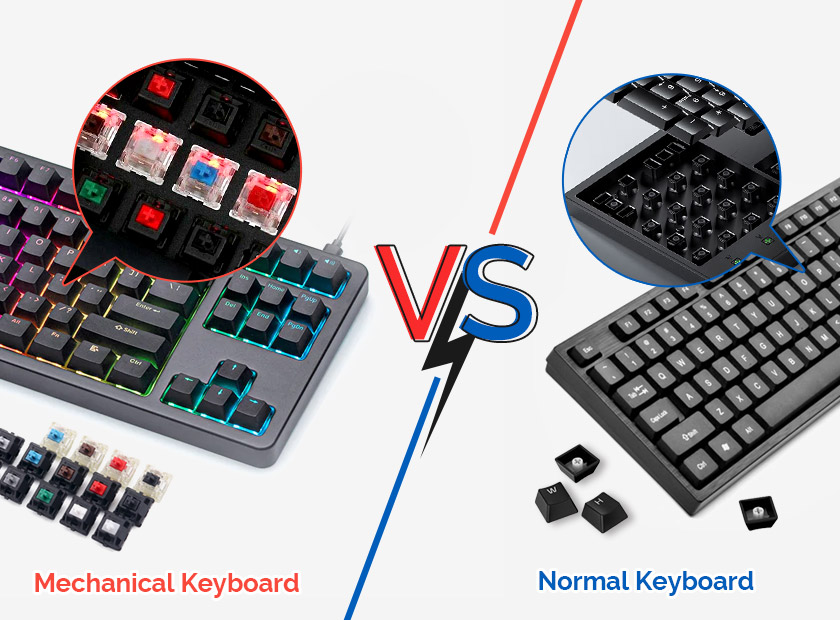
A mechanical keyboard is different. It uses special switches. These switches are under each key. When you press a key, the switch moves. This sends a signal to the computer.
Why Are Mechanical Keyboards Special?
Mechanical keyboards feel good to type on. They make a click sound. Many people like this sound. Some say it helps them type better.
Durable And Long-lasting
Mechanical keyboards last a long time. Their switches are strong. They can handle many presses. This makes them popular with gamers and writers.
How to Tell If Your Keyboard Is Mechanical?
There are simple ways to check. You don’t need special tools. Just follow these steps.
Listen For The Click Sound
Press a key. Do you hear a click? Mechanical keyboards often make this sound. If you hear it, your keyboard might be mechanical.
Check The Key Feel
Press a few keys. Do they feel different? Mechanical keys feel solid. They bounce back quickly. If your keys feel like this, it’s a good sign.
Look Under A Keycap
Keycaps are the tops of keys. You can remove them. Use your fingers or a keycap puller. Look under the keycap. Do you see a switch? If yes, it might be mechanical.
Search For Switch Brand Names
Mechanical keyboards have switch brands. Look for names like Cherry MX or Gateron. These are popular mechanical switches. Check the box or manual of your keyboard.
Check Online Information
Search online for your keyboard model. Type the name into a search engine. Find the product page or reviews. They often say if a keyboard is mechanical.
Types of Mechanical Switches
Mechanical keyboards have different switches. Each has a unique feel and sound.
Cherry Mx Switches
Cherry MX switches are well-known. They come in colors like red, blue, and brown. Each color feels different. Blue switches are loud. Red switches are quiet. Brown switches are in-between.
Gateron Switches
Gateron switches are similar. They also have colors. Many people say Gateron switches feel smoother.
Kailh Switches
Kailh switches are another option. They are less expensive. Some people like them for gaming.
| Switch Type | Feel | Sound |
|---|---|---|
| Cherry MX Blue | Clicky | Loud |
| Cherry MX Red | Linear | Quiet |
| Cherry MX Brown | Tactile | Moderate |
| Gateron Blue | Clicky | Loud |
| Gateron Red | Linear | Quiet |
| Kailh Brown | Tactile | Moderate |
Benefits of Mechanical Keyboards
Mechanical keyboards have many benefits. People choose them for different reasons.
Comfortable Typing
Mechanical keyboards are comfortable. They can help you type faster. Your fingers don’t get tired easily.
Customizable Options
You can customize mechanical keyboards. Change the keycaps. Add colorful lights. Make it your own.
Improved Performance
Mechanical keyboards can improve your performance. Gamers like the fast response. Writers enjoy the tactile feedback.
Frequently Asked Questions
What Is A Mechanical Keyboard?
A mechanical keyboard uses individual switches for each key. Provides tactile feedback and durability.
How Do Mechanical Switches Work?
Mechanical switches activate when pressed. They use a spring-loaded mechanism. Offers a satisfying click or bump.
Why Choose A Mechanical Keyboard?
Mechanical keyboards are durable. Offer better typing experience. Ideal for gamers and typists.
Can You Feel The Difference In Typing?
Yes, mechanical keyboards offer tactile feedback. More responsive. Easier to type for long periods.
Conclusion
Mechanical keyboards are unique. They offer a special typing experience. Now you know how to identify them. Listen for clicks. Feel the keys. Look for switches. Check online. Enjoy your typing journey!