


The keyboard polling rate, measured in Hertz (Hz), refers to how often a keyboard sends data to a computer. Specifically, it indicates the number of times per second the input signal is sent. A higher polling rate results in more frequent updates, which can significantly enhance gaming performance. For instance, a common polling rate for gaming keyboards is 1000 Hz, meaning the keyboard reports its input to the computer every millisecond.
Lower polling rates, such as 125 Hz (which reports every 8 milliseconds), can introduce noticeable latency. In fast-paced gaming scenarios, even a slight delay can be detrimental. Consequently, gamers often prefer keyboards with higher polling rates as they allow for quicker response times, translating to improved performance during crucial moments of gameplay.
For instance, if a keyboard operates at a 1000 Hz polling rate, it provides a more immediate response to keystrokes compared to a standard 125 Hz keyboard. This enhanced responsiveness is crucial in competitive gaming environments where every millisecond counts in terms of executing commands and actions.
Additionally, it is essential to consider the relationship between polling rate and latency. The latency is the time taken for the keyboard input to be recognized by the computer, and a higher polling rate effectively reduces this latency. As a result, gamers can experience a smoother and more reactive gameplay experience, which can be the deciding factor in high-stakes matches.
In summary, understanding and optimizing the keyboard polling rate is integral to maximizing gaming performance. Gamers looking to enhance their responsiveness should consider investing in keyboards that support higher polling rates, thereby reducing latency and improving their overall gameplay experience.
Configuring Key Bindings for Efficiency
Customizing key bindings is a crucial aspect of optimizing gaming performance. By assigning specific actions to keys that are conveniently located, players can enhance their ability to execute commands swiftly and accurately. This adaptability is especially beneficial during intense gameplay, where every millisecond can determine the outcome of a game.
To begin, it is advisable to identify the most frequently used commands within a game. Key actions such as jumping, crouching, or using special abilities often require quick reflexes. Assigning these commands to easily accessible keys can significantly reduce the time it takes to perform them, ultimately improving reaction times. For instance, moving a command traditionally assigned to the ‘F’ key to a more reachable key like ‘Q’ can make it easier to utilize during critical moments.
Furthermore, consider ergonomics when configuring your key bindings. The ideal setup should minimize finger movement and strain. Players should try to utilize keys that comfortably align with their natural hand positions. Exploring alternative layouts, such as the one used in ergonomic gaming keyboards, may also provide additional comfort and efficiency. Additionally, using modifier keys can create a more versatile layout, allowing multiple functions to be assigned to a single key without overcrowding. For instance, holding down a modifier key while pressing another can trigger an alternate action.
Finally, continuously revisiting and refining your key bindings based on gameplay experiences is necessary. Regular practice will reveal which settings feel most intuitive and effective. Ultimately, investing time in customizing key bindings can lead to a substantial improvement in gaming performance, as it grants players a competitive edge by ensuring that essential actions are always within reach.
Using Macros to Enhance Gameplay
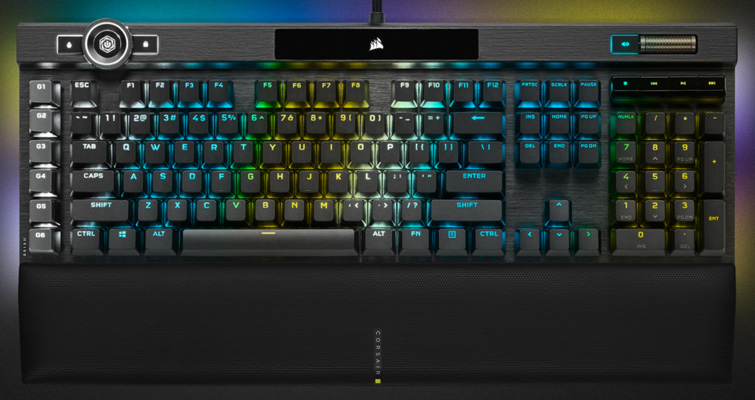
Macros have emerged as a powerful tool in the world of gaming, allowing players to automate complex sequences of actions with a single keystroke. This advancement can significantly improve gameplay by streamlining processes that may otherwise require multiple, time-consuming inputs. Macros work by recording a series of inputs within a specific game scenario, enabling players to execute these actions seamlessly. This feature can be particularly beneficial in fast-paced environments where speed and precision are crucial.
To set up macros, users typically need to access their gaming keyboard’s software, which often comes with a dedicated application. Within this software, players can create new macros by recording their desired actions. This involves pressing a designated key to start the recording process, followed by performing the sequence of actions to be automated. Once the desired sequence is completed, players can stop the recording and assign it to a specific key on their keyboard. This simplicity makes macros accessible to both novice and experienced gamers alike.
When implementing macros, players must consider the gaming context. In PvE (Player versus Environment) settings or casual play, the use of macros can greatly enhance efficiency, reducing the overall effort required to perform complex actions. However, in competitive gaming scenarios, players should be cautious. Certain games enforce strict rules against macro use, and employing them could result in penalties or bans. Therefore, it is essential to understand the guidelines of each game and ensure that macro use does not contravene any established regulations. By carefully integrating macros into gameplay while adhering to game rules, players can potentially gain a competitive edge without risk.
Adjusting Key Sensitivity and Repeat Rate
To enhance your gaming performance, tuning the key sensitivity and repeat rate settings on your keyboard can be pivotal. These adjustments impact how responsive your keyboard is to your inputs, which in turn affects your overall gameplay experience. Key sensitivity determines how much pressure is required to register a keystroke, while the repeat rate dictates how quickly a key will register repeated presses.
Understanding the difference between linear and non-linear key responses is essential for optimizing these settings. A linear response means that a key’s activation is directly proportional to the applied pressure; the harder you press, the faster the response. This can be particularly beneficial in fast-paced games where reaction time is critical, as it allows for deliberate control over actions. Non-linear responses, however, may increase sensitivity at certain pressure thresholds, potentially leading to quicker gameplay actions with lighter touches.
When adjusting these settings, consider the specific types of games you play. For instance, first-person shooters often benefit from lower sensitivity settings to improve accuracy in aiming. Conversely, real-time strategy games may require higher sensitivity to issue commands more rapidly. It is advisable to experiment with different configurations to find a balance that suits your style. Many modern keyboards come equipped with software that allows customization of key sensitivity and repeat rates, providing an avenue to tailor settings according to personal preference.
Overall, fine-tuning these settings can significantly enhance your gaming performance, providing a more satisfying and effective gaming experience. Taking the time to optimize key sensitivity and repeat rates is a crucial step for serious gamers looking to improve their overall play.
Choosing the Right Keyboard for Gaming
When it comes to optimizing gaming performance, selecting the right keyboard is paramount. Gaming keyboards generally fall into two categories: mechanical and membrane. Each type has its unique characteristics and features that can significantly influence gameplay.
Mechanical keyboards are known for their individual mechanical switches beneath each key. This design provides tactile feedback and faster response times, making them ideal for competitive gaming. The switches vary in type, including linear, clicky, and tactile, allowing users to choose based on their preferences for actuation force and sound. The longevity of mechanical keyboards is another advantage, as they often withstand millions of keystrokes, making them a worthy investment for avid gamers.
On the other hand, membrane keyboards are quieter and typically more affordable, featuring a pressure pad system beneath the keys. This can make them a suitable option for casual gamers or those who require a quieter environment. However, membrane keyboards generally do not provide the same level of responsiveness as their mechanical counterparts. While they can be more comfortable for typing tasks, they may not deliver the performance necessary for fast-paced gaming.
In terms of recommendations, aspiring competitive players may gravitate towards keyboards like the Corsair K70 RGB (mechanical) or the Razer Huntsman Elite, which offer customizable RGB lighting and programmable macros. For casual gamers, affordable options such as the Logitech K120 (membrane) can suffice for less demanding gaming situations.
Ultimately, the choice between mechanical and membrane keyboards will depend on individual gaming preferences, budget, and desired features. Assessing how each type aligns with one’s gaming style is essential for enhancing overall gaming performance.
Utilizing Gaming Software for Custom Profiles
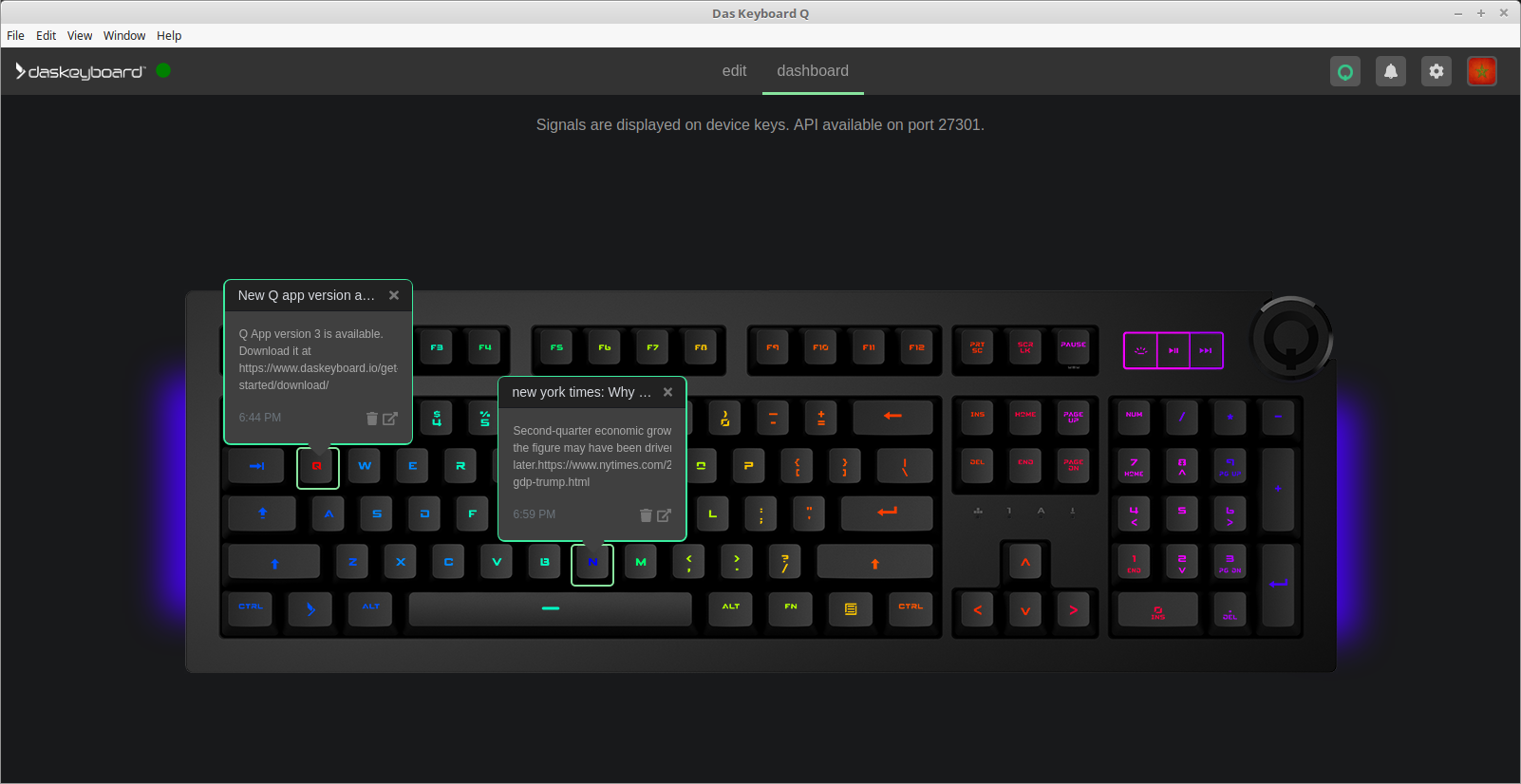
Modern gaming keyboards often come equipped with dedicated gaming software that allows users to create custom profiles tailored to specific games. This software is an essential tool for optimizing gaming performance effectively. By utilizing such software, gamers can configure key bindings, set macros, and customize lighting effects to enhance their overall gaming experience.
One of the primary features of gaming software is the ability to create multiple profiles for different games. Each game may have unique requirements, and being able to switch between profiles can significantly improve user experience. For instance, a first-person shooter may require rapid key presses and specific macros for quick actions, whereas a strategy game might benefit from a different set of commands. Users can set up profiles that switch automatically when a game is launched, ensuring that the right settings are always in place.
In addition to creating profiles, the software frequently includes RGB lighting customization options. Beyond aesthetics, adjustable lighting can serve functional purposes, such as signaling incoming notifications or health status in games. Moreover, some software solutions enable synchronization with other peripherals, creating a cohesive look across a gaming setup. This can positively affect a player’s immersion and enjoyment during gameplay.
Performance settings are another critical aspect that can be optimized through gaming software. Many keyboards offer features such as polling rate adjustments, which control how frequently inputs are sent to the computer. By increasing the polling rate, gamers can achieve more responsive performance, minimizing input lag and enhancing their overall gaming effectiveness. Therefore, getting acquainted with gaming software and its myriad of features can lead to significant enhancements in gaming performance, efficiency, and enjoyment.
Understanding N-Key Rollover and Anti-Ghosting
In the realm of gaming, having a responsive and reliable keyboard is paramount. Two significant features that enhance gaming performance are N-key rollover (NKRO) and anti-ghosting. Understanding these concepts will shed light on how they can impact your gaming experience, especially in competitive scenarios.
N-key rollover is a keyboard feature that allows multiple keys to be pressed simultaneously without missing any keystrokes. In simpler terms, with an N-key rollover keyboard, every keypress is registered regardless of how many keys are pressed at the same time. This is crucial for gamers who often utilize intricate combinations of keys during gameplay, ensuring that every command is executed without delay. For instance, in fast-paced games where maneuvering and executing actions simultaneously can determine the outcome, NKRO can provide the edge needed to gain a competitive advantage.
On the other hand, anti-ghosting is a related technology that prevents unwanted signal interference when multiple keys are pressed. Ghosting occurs when the keyboard fails to register a keystroke because another key is pressed at the same time. Anti-ghosting works in harmony with N-key rollover by ensuring that every key action is accurately registered, which is particularly beneficial during moments of intense gameplay. When a player is required to jump, crouch, and shoot simultaneously, anti-ghosting ensures that their commands are accurately delivered to the game without any input loss.
Ultimately, the integration of N-key rollover and anti-ghosting in a gaming keyboard can significantly enhance performance, allowing gamers to execute complex moves with confidence. Selecting a keyboard that features these technologies is an investment that can improve overall gaming efficiency and responsiveness.
Regular Maintenance and Updates for Optimal Performance
Ensuring that your gaming keyboard performs at its best requires regular maintenance and timely updates. A good starting point is keeping the keyboard firmware and software up to date. Many gaming keyboards now come equipped with customizable settings and features that can enhance gaming performance. Manufacturers periodically release updates to fix bugs, improve functionality, and enhance user experience. Regularly checking the manufacturer’s website or using proprietary software can facilitate the timely installation of the latest updates.
In addition to firmware updates, physical maintenance of the keyboard is crucial. Dust, dirt, and food particles can accumulate between the keys, potentially affecting performance and comfort during gameplay. Regular cleaning can prevent this buildup and prolong the life of the keyboard. To clean your keyboard, start by unplugging it or turning it off if it is wireless. Use compressed air to dislodge any debris trapped under the keys. For deeper cleaning, gently remove the keycaps using a keycap puller and wipe the surface with a damp cloth, followed by letting it dry thoroughly before reassembly.
Moreover, many common issues can be addressed through simple troubleshooting techniques. If the keyboard fails to respond or certain keys stick, it may require a thorough cleaning or inspection for hardware faults. Checking connections—whether wired or wireless—and ensuring the keyboard is paired correctly can often resolve connectivity issues. Additionally, reviewing software settings can help address any configuration errors that may hinder performance. By committing to regular maintenance and software updates, gamers can ensure their keyboards remain responsive, effective tools for high-stakes gaming.
The Future of Keyboard Technology in Gaming

The evolving landscape of gaming is strongly influenced by advancements in keyboard technology. As gaming continues to be a dominant form of entertainment, manufacturers are focusing on innovations that enhance gameplay, responsiveness, and player comfort. One significant trend is the growing shift towards wireless technologies. Modern gamers demand flexibility and freedom of movement, prompting the development of high-performance wireless keyboards that offer low latency and uninterrupted connectivity. This development enables players to enjoy a clutter-free gaming setup without compromising on responsiveness, which is crucial during intense gaming sessions.
Another emerging trend is the rise of programmable keys on gaming keyboards. Programmable keys allow gamers to customize their gaming experience significantly, enabling them to assign complex macros or shortcuts with ease. This feature grants players a competitive edge, as they can streamline their actions and reduce the time taken to execute commands. Furthermore, advanced software tools are being developed that enhance key customization, allowing for extensive configuration tailored to individual gaming styles. This level of personalization is set to become a standard expectation among gamers.
The integration of artificial intelligence (AI) into keyboard technology is another exciting avenue for the future. AI algorithms can analyze a player’s gaming patterns and adapt keyboard settings in real time to improve efficiency and performance. For instance, AI could suggest optimal key bindings or configurations based on the player’s history and preferences. This personalized adaptation could significantly enhance user experience, making gaming keyboards smarter and more intuitive.
As these trends unfold, it’s clear that the next generation of gaming keyboards will be characterized by enhanced functionality and personalization. The blending of wireless capabilities, programmable features, and AI-driven enhancements is transforming keyboards into essential tools for achieving superior gaming performance.


