


If you’re looking for a keyboard that boosts your typing speed and feels great under your fingers, the Ducky One 3 TKL might be exactly what you need. This compact, sleek keyboard is designed to fit your desk perfectly without sacrificing performance.
Whether you’re gaming, working, or just typing away, the Ducky One 3 TKL offers a smooth, responsive experience that can change the way you interact with your computer. Keep reading to discover why this keyboard stands out and how it can make your daily tasks easier and more enjoyable.
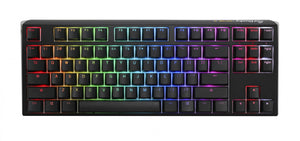
Ducky One 3 Tkl
This keyboard is a great choice for people who type a lot. It is also preferred by gamers for its quick response time.
Design And Build Quality
Compact Tkl Layout
The Tenkeyless (TKL) layout is more compact than full-sized keyboards. This makes it easier to fit on small desks. It also leaves more space for mouse movement. Despite its size, it includes all essential keys. This balance of space and functionality is ideal for many users.
Material And Finish
The keyboard is made from high-quality plastic. This material is durable and long-lasting. The finish is smooth and sleek. The build feels sturdy, with no creaking parts. This ensures a comfortable typing experience.
Keycap Quality
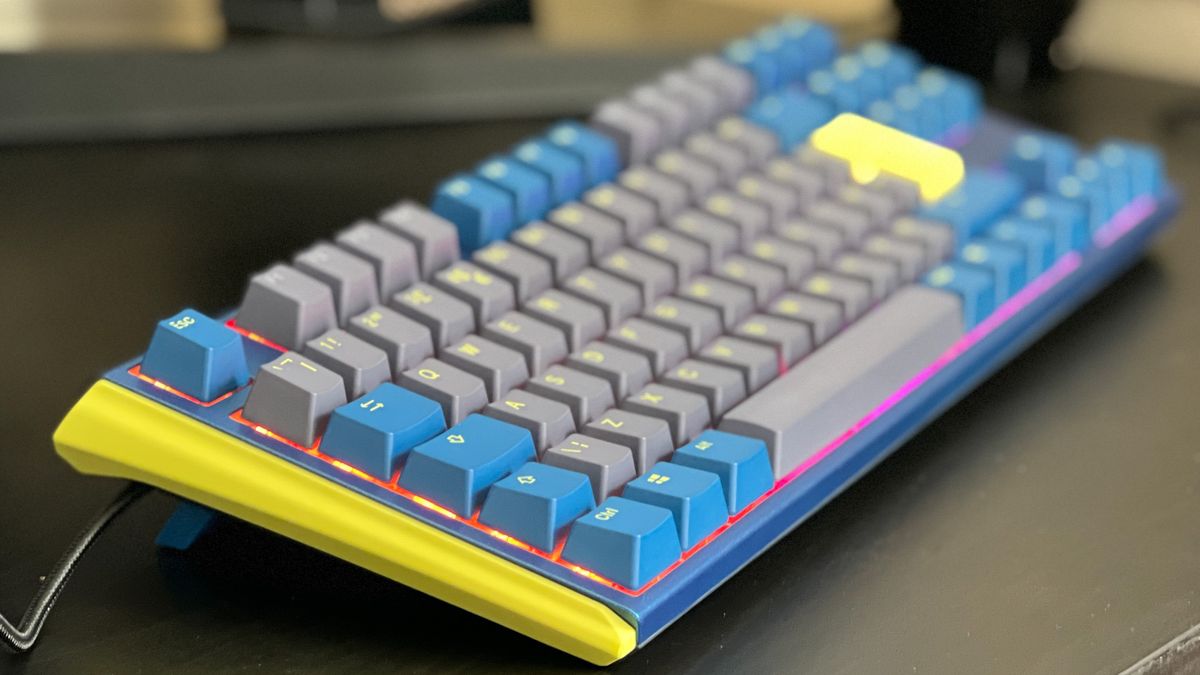
The keycaps are made from double-shot PBT. This type of plastic is known for its strength. It resists wear and tear over time. Each keycap has a smooth surface for easy typing. The legends on the keys do not fade, even with heavy use.
- Double-shot PBT for durability
- Legends remain clear and visible
- Smooth surface for comfortable typing
Switch Options And Typing Experience
The Ducky One 3 TKL offers various switch options for different typing preferences. Each switch type changes how the keyboard feels and sounds. Understanding these switch options helps you pick the best typing experience for your needs.
Available Switch Types
The Ducky One 3 TKL supports several popular mechanical switches. These include tactile, linear, and clicky types. Each switch type suits different users.
- Cherry MX Red: Smooth and quiet linear switch
- Cherry MX Brown: Tactile bump without loud click
- Cherry MX Blue: Tactile and clicky with audible feedback
- Cherry MX Silent Red: Quiet linear switch for low noise
Tactile Feedback And Sound
Tactile feedback helps you feel when a key is registered. It improves typing accuracy and reduces errors. The sound varies by switch type. Clicky switches make a loud sound with each press. Tactile switches have a soft bump and less noise. Linear switches are smooth and quiet.
- Clicky switches provide clear audio feedback
- Tactile switches offer a gentle bump without loud clicks
- Linear switches focus on smooth and silent keystrokes
Typing Comfort And Speed
The Ducky One 3 TKL is designed to support fast and comfortable typing. Its compact layout reduces hand movement. This lowers fatigue during long sessions. Switch choice affects typing speed. Linear switches allow quick key presses. Tactile switches help with precise typing. Comfort depends on your personal preference.
Rgb Lighting And Customization
The Ducky One 3 TKL keyboard offers vibrant RGB lighting that enhances your desk setup. You can change the lights to match your mood or style. This keyboard lets you customize lighting effects easily. It has many options to make your typing experience more fun and personal.
Lighting Effects
The Ducky One 3 TKL comes with many built-in lighting effects. These include waves, ripples, and reactive modes that respond to your keystrokes. You can choose static colors or dynamic animations to make your keyboard stand out. The effects can be bright or subtle, based on your preference.
- Static colors for a simple look
- Breathing effect for smooth transitions
- Wave effect for moving colors
- Reactive lighting that reacts to typing
Software Vs Hardware Control
You can control the Ducky One 3 TKL lighting without software. The keyboard has onboard controls to change effects and colors. Using the keyboard’s hardware keys is quick and does not need extra programs. This works well if you want simple changes fast. Some users prefer software control for deeper customization. Software lets you create complex lighting patterns and save profiles.
- Hardware control: change effects with key combos
- Software control: design custom lighting profiles
- Hardware is easy and fast
- Software is flexible and detailed
Customization Tips
To customize your keyboard, start with simple lighting effects. Try different colors to find what feels best for you. Use hardware controls to learn the basics. Then explore software options for unique designs and profiles.
- Test each lighting mode to see what you like
- Pick colors that match your setup
- Create profiles for work and play
- Save your settings to avoid losing them
Connectivity And Compatibility
The Ducky One 3 TKL keyboard connects easily to many devices. It uses a wired connection for stable performance. This keyboard works with different systems. You can use it with Windows, macOS, and Linux computers.
Wired Connection Features
The Ducky One 3 TKL uses a wired USB connection. This gives fast and reliable input without delays. The keyboard supports full N-key rollover. This means every key press is registered, even when many keys are pressed at once.
- USB Type-C wired connection
- Fast data transfer speed
- Full N-key rollover support
- Low input latency
Cross-platform Support
The Ducky One 3 TKL works with many operating systems. It supports Windows, macOS, and Linux without extra drivers. Key functions and media keys adjust automatically to your system. This makes the keyboard easy to use on different devices.
- Compatible with Windows 7 and later
- Supports macOS versions
- Works on most Linux distributions
- Plug-and-play setup
Cable And Port Details
The keyboard connects via a detachable USB Type-C cable. This cable is durable and easy to replace if needed. The USB Type-C port on the keyboard fits standard cables. The cable length is long enough for desktop setups.
- Detachable USB Type-C cable included
- Cable length: approximately 1.8 meters (6 feet)
- Supports USB 2.0 speeds
- Compatible with USB Type-A ports using adapters
Performance In Gaming
The Ducky One 3 TKL keyboard offers solid performance for gamers. It has features that help improve gameplay and response. Players need fast and accurate input to compete well. This keyboard is designed to meet those needs.
Response Time And Anti-ghosting
The Ducky One 3 TKL has a fast response time. This helps players react quickly in games. Anti-ghosting prevents missed or false key presses. It ensures every key press is registered correctly.
- Fast key actuation for quick reactions
- Anti-ghosting supports multiple keys pressed at once
- Improves accuracy during intense gaming sessions
Macro And Key Rollover
This keyboard supports full key rollover. You can press many keys at the same time without errors. It allows custom macros for complex commands. This helps in games that need quick combos.
- Full N-key rollover for simultaneous key presses
- Macro support to record and play key sequences
- Improves control in games needing multiple inputs
Popular Game Testing
The Ducky One 3 TKL performs well in popular games like FPS and MOBAs. It keeps up with fast actions and combos. Players report smooth input and no missed keys. This helps keep gameplay fluid and responsive.
- FPS games: quick aiming and shooting
- MOBAs: fast skill combos
- MMORPGs: reliable input for many commands
Additional Features
The Ducky One 3 Tkl comes with several useful extra features. These improve the typing experience and make the keyboard easier to use. These features add convenience and customization options for users who want more control over their keyboard.
Detachable Cable
The Ducky One 3 Tkl has a detachable USB-C cable. This makes it easy to carry and store the keyboard.
You can replace the cable if it gets damaged or use a longer one. This adds flexibility for different setups.
Onboard Memory
This keyboard includes onboard memory to save your settings. You can keep your custom key layouts and lighting effects. Onboard memory lets you use your preferred setup on any computer without extra software.
Software Integration
The Ducky One 3 Tkl supports software integration for deeper customization. You can program keys and change lighting patterns. The software is easy to use and helps you personalize your keyboard to fit your needs.
Comparison With Previous Models
The Ducky One 3 TKL builds on the success of earlier models. It keeps the compact tenkeyless design that many users like. This model offers changes that improve typing feel and overall use. Let’s look at how it compares to the One 2 TKL.
Improvements Over One 2 Tkl
The One 3 TKL has a new case design. It feels more solid and less noisy during use. Keycaps are made with better double-shot PBT material. This makes them more durable and comfortable to type on.
- New case with sound dampening
- Improved PBT keycaps
- Hot-swappable switch option available
- Enhanced stabilizers for less rattle
Feature Differences
The One 3 TKL adds hot-swappable switches on some versions. This lets users change switches without soldering. The USB-C port is now on the top side. This change helps with cable management compared to the older bottom port.
| Feature | One 2 TKL | One 3 TKL |
|---|---|---|
| Switch Type | Soldered | Hot-swappable (some versions) |
| USB Port Location | Bottom | Top |
| Keycap Material | Double-shot PBT | Improved double-shot PBT |
| Stabilizers | Standard | Enhanced, less rattle |
User Feedback
Many users say the One 3 TKL feels more solid and quiet. They like the new keycaps and case design. Some users appreciate the hot-swap feature. It allows easy switch customization without extra tools.
- Positive comments on build quality
- Better typing comfort reported
- Hot-swap praised for flexibility
- Some users miss the older USB port location
Price And Value
The Ducky One 3 TKL is a popular mechanical keyboard known for its quality. Its price reflects its build and features. Understanding the cost and value helps decide if it fits your needs and budget.
Cost Analysis
The Ducky One 3 TKL costs around $110 to $130 depending on the retailer. This price includes premium keycaps and PBT material. You pay for durable switches and a solid build, which reduces the need for quick replacement.
Competitor Comparison
Several TKL keyboards compete in this price range. The Ducky One 3 stands out in key feel and build quality.
| Keyboard | Price | Keycaps | Switches |
|---|---|---|---|
| Ducky One 3 TKL | $110 – $130 | PBT Double-Shot | Cherry MX |
| Keychron K8 | $90 – $110 | ABS | Gateron |
| Leopold FC750R | $120 – $140 | PBT | Cherry MX |
Long-term Investment
The Ducky One 3 TKL is built to last many years without losing quality. This saves money over time. Its replaceable keycaps and durable switches make maintenance easy and cost-effective.
- Strong build reduces wear and tear
- High-quality materials resist fading
- Easy to clean and repair parts
Frequently Asked Questions
What Are The Key Features Of The Ducky One 3 Tkl?
The Ducky One 3 Tkl features a compact tenkeyless design, RGB backlighting, and hot-swappable switches. It offers durable PBT keycaps and customizable macros, making it ideal for gaming and productivity.
Is The Ducky One 3 Tkl Suitable For Gaming?
Yes, the Ducky One 3 Tkl is perfect for gaming due to its responsive mechanical switches, compact size, and anti-ghosting technology. It provides fast, accurate keypresses enhancing gaming performance.
Can I Customize The Switches On The Ducky One 3 Tkl?
Absolutely. The Ducky One 3 Tkl supports hot-swappable switches, allowing users to easily replace or upgrade switches without soldering. This adds flexibility and personalization options.
How Durable Is The Ducky One 3 Tkl Keyboard?
The Ducky One 3 Tkl is highly durable, featuring PBT double-shot keycaps and a robust plastic case. It withstands heavy daily use and resists wear and fading.
Conclusion
The Ducky One 3 TKL offers a solid typing experience and reliable build. Its compact size saves desk space without losing key functions. Users enjoy responsive keys and clean design. This keyboard fits well for work and play alike. Consider it if you want a simple, quality TKL option.
It balances performance and comfort in a neat package. A smart choice for those who value efficiency and style.


