


In the pursuit of the perfect gaming keyboard, understanding the different types available can significantly enhance one’s gaming experience. The three primary categories of gaming keyboards are mechanical, membrane, and hybrid keyboards, each offering distinct features and benefits.
Mechanical keyboards are widely favored for their tactile feedback and durability. Utilizing individual mechanical switches under each key, they provide a more responsive feel, which can be advantageous in fast-paced games. The distinct “click” of some mechanical switches can also enhance the typing experience. However, these keyboards tend to be heavier and pricier compared to other types.
On the other hand, membrane keyboards are constructed with a softer, more muted response. They operate using a pressure pad system rather than individual switches, which allows for quieter keystrokes but often lacks the distinct tactile feedback that many gamers prefer. Membrane keyboards are generally more affordable and lighter, making them a popular choice for casual gamers or those on a budget. A downside is that they may not last as long as their mechanical counterparts, especially under heavy use.
Lastly, hybrid keyboards combine elements of both mechanical and membrane technologies. They typically feature membrane keys but incorporate mechanical-like switches for improved responsiveness. This type aims to provide the best of both worlds, offering a balance of performance and affordability. Gamers who value both sleek design and effective functioning may find hybrid keyboards appealing.
Ultimately, the choice of keyboard type can greatly influence one’s gaming performance. Understanding these differences ensures that gamers can select a keyboard that aligns seamlessly with their gaming style and preferences.
Key Switches Explained
When it comes to gaming keyboards, the choice of key switches plays a crucial role in the overall gaming experience. Key switches can significantly impact factors such as response time, tactile feedback, and the force required to actuate a key. Among the most popular options are Cherry MX switches, Razer switches, and others, each offering unique features tailored for various gaming preferences.
Cherry MX switches are perhaps the most recognized in the gaming community. They are known for their reliability and variety, which includes options like Red, Blue, and Brown switches. Cherry MX Red switches are favored by many gamers for their linear feel and low actuation force, allowing for quick key presses that can enhance gaming performance. On the other hand, Cherry MX Blue switches offer a tactile bump and an audible click, providing feedback that some gamers prefer, albeit at the expense of some noise during play.
Razer switches, developed by Razer, provide their own set of distinct characteristics. The Razer Green switch, for example, is similar to Cherry MX Blue, delivering that satisfying click and tactile feedback. Conversely, the Razer Yellow switch is geared towards gamers seeking a quieter experience without compromising key sensitivity. This is designed specifically for gaming, as the low resistance and fast actuation can contribute to improved response times.
Other manufacturers have introduced their own switches, each with unique traits that cater to gamers’ needs. For example, the Logitech Romer-G switches are designed for durability and shorter actuation distance, which means faster response time. When selecting a gaming keyboard, understanding these switches and their effects on performance can be essential in deciding the best fit for your style of play.
Wired vs. Wireless Keyboards
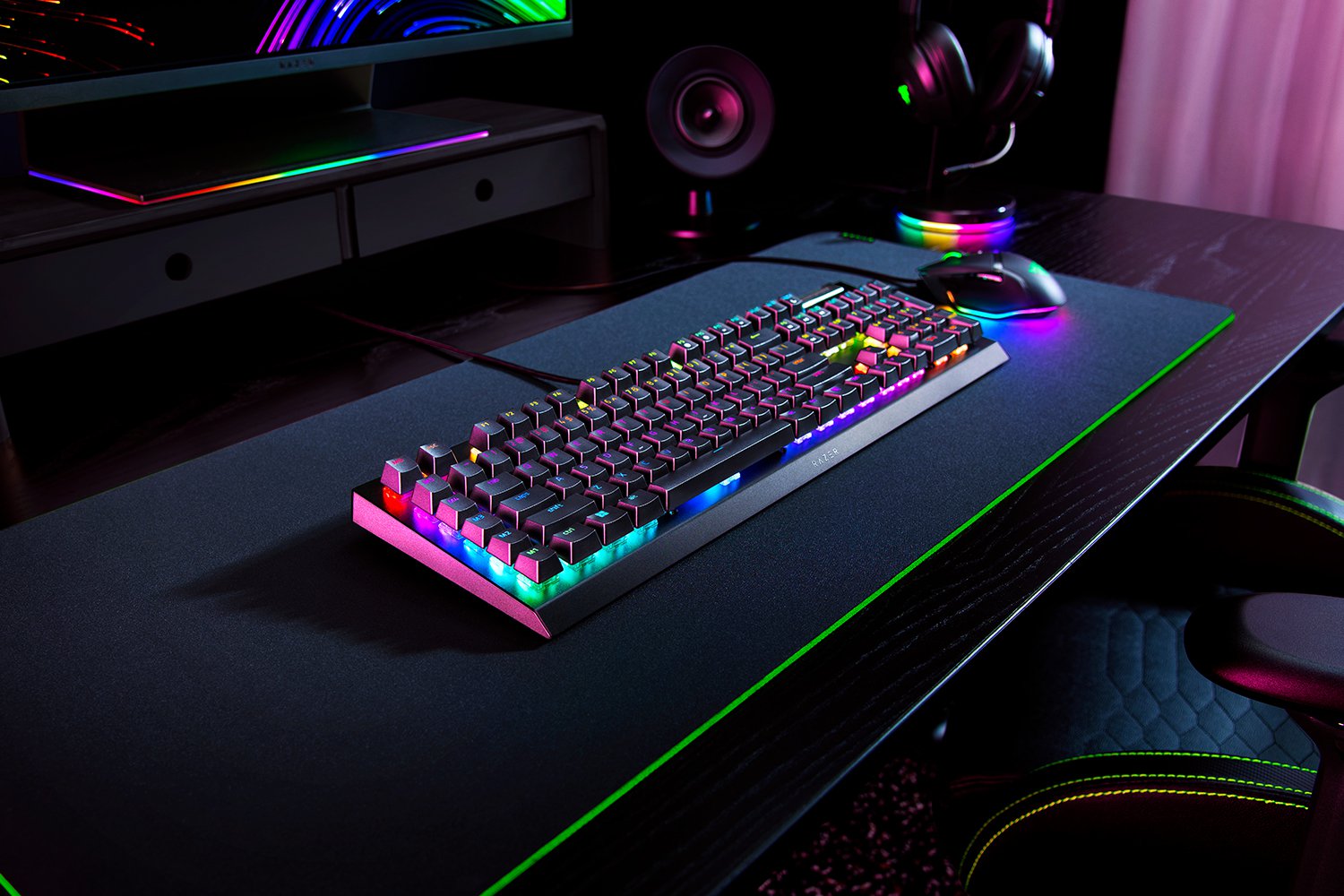
When choosing the ideal gaming keyboard, one critical decision you must make is whether to opt for a wired or wireless model. Each type presents its distinct benefits and drawbacks, and understanding these differences can significantly influence your gaming experience.
Wired gaming keyboards are traditionally preferred in competitive gaming environments due to their consistent performance and low latency. A wired connection eliminates the risk of interference and provides a direct line between the keyboard and the computer, resulting in quicker response times. This advantage allows gamers to perform at peak levels, particularly in fast-paced games where every millisecond counts.
On the other hand, wireless keyboards have come a long way in recent years, offering functionality that rivals their wired counterparts. However, one of the primary concerns about wireless models is latency. While many high-end wireless keyboards now boast technology that minimizes lag, there can still be slight delays compared to their wired versions. This factor can be crucial for competitive gamers and those who prioritize precision.
Battery life is another consideration when it comes to wireless gaming keyboards. Regular charging or battery replacement can be inconvenient during prolonged gaming sessions, and any loss of power can lead to sudden interruptions. Proper management of battery life is essential for ensuring seamless gameplay without disruptions.
Ultimately, the choice between wired and wireless gaming keyboards depends on individual preferences and gaming styles. For serious gamers who require absolute reliability and performance, a wired keyboard may be the ideal choice. Conversely, for those who value portability and a cleaner setup, a high-quality wireless keyboard could be an appealing alternative. Carefully weighing these factors will guide you toward the keyboard that best aligns with your gaming needs.
Ergonomics and Comfort
When selecting a gaming keyboard, ergonomics and comfort should be at the forefront of your decision-making process. Gaming sessions can last for hours, and a keyboard designed with ergonomic features can significantly reduce strain and discomfort, enhancing your overall gaming experience.
One of the key ergonomic features to consider is the presence of a wrist rest. A wrist rest helps maintain a neutral wrist position, which is essential for preventing strain and fatigue. Many gaming keyboards come with specially designed wrist rests made from gel or foam, providing support during prolonged use. Some keyboards even offer detachable rests, allowing for customization based on personal preference.
The layout of the keyboard is another crucial aspect that contributes to ergonomic comfort. Keyboards with a standard layout may be fine for casual use, but gaming keyboards often feature customizable layouts that provide better access to frequently used keys. Additionally, keyboards with dedicated macro keys can enhance performance in competitive gaming scenarios, minimizing the need for hand movement and improving overall comfort.
Height adjustment is also an important ergonomic consideration. Most gaming keyboards offer adjustable feet, allowing users to modify the angle of the keyboard to suit their personal comfort level. A keyboard positioned at the right height can prevent wrist strain and improve typing posture, which is critical for long gaming sessions.
Investing in a gaming keyboard that prioritizes ergonomic design is essential for anyone who requires extended usage. By focusing on features such as wrist rests, customizable key layouts, and adjustable heights, gamers can ensure that their setup minimizes discomfort and maximizes performance during their gaming adventures.
Backlighting and Aesthetics
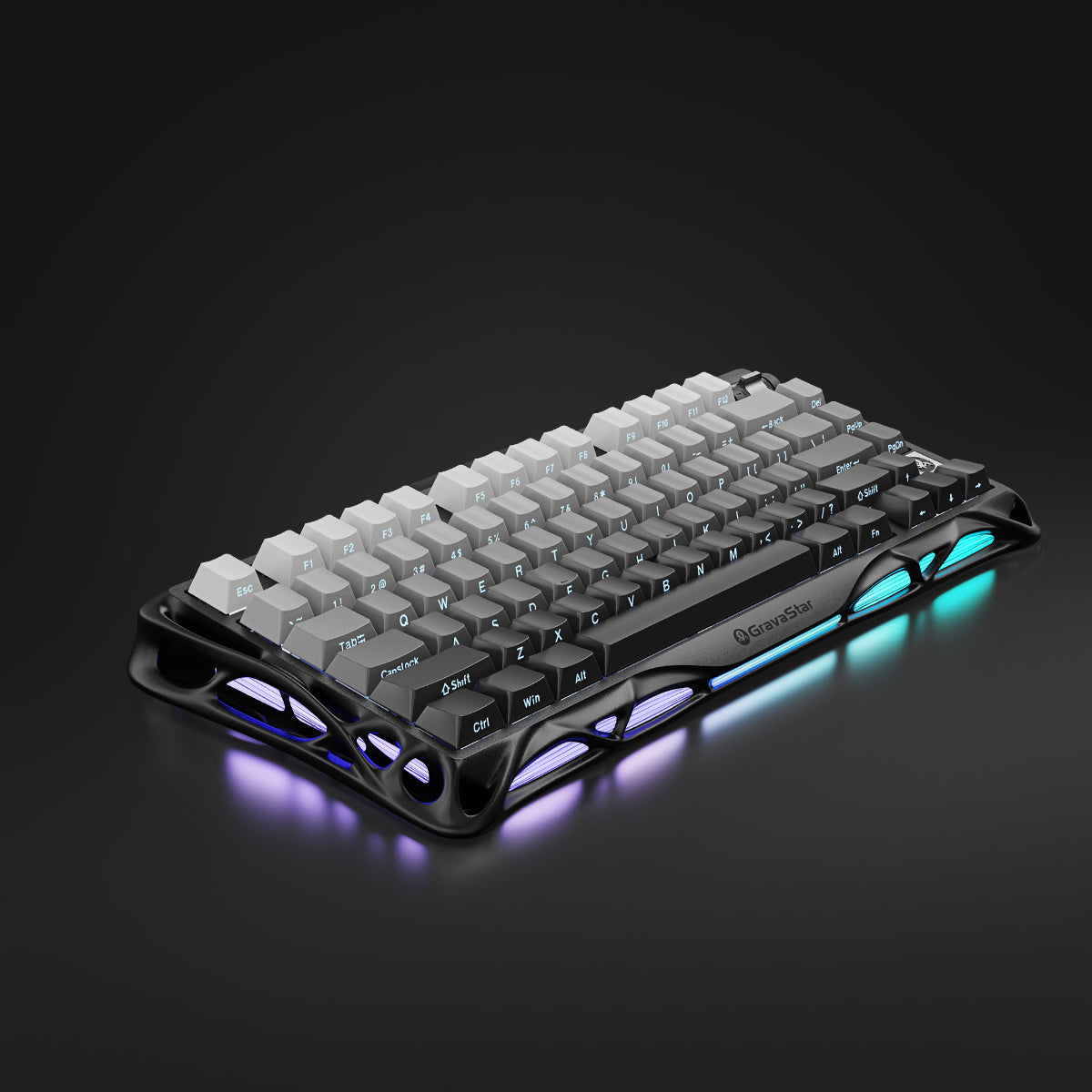
The appearance of a gaming keyboard is an essential factor for many gamers, as it can enhance the overall gaming experience. Modern gaming keyboards come equipped with various backlighting options that enable users to customize their setup significantly. RGB backlighting has become particularly popular, offering a spectrum of colors that can be tailored to match personal preferences or specific game themes. This dynamic lighting not only serves a functional purpose, such as aiding visibility in darkness, but also adds an aesthetic flair that many gamers appreciate.
Moreover, the allure of customizable keycap designs can further elevate the visual appeal of a gaming keyboard. Keycaps are available in various shapes, sizes, and materials, giving users the opportunity to express their unique style. From sleek, minimalist designs to vibrant, eye-catching patterns, the right keycap selection can complement or even transform the overall look of a gaming setup. For those who value individuality, the combination of RGB backlighting and distinctive keycap designs allows for virtually limitless customization.
Furthermore, many gaming keyboards feature software that enables users to synchronize lighting effects with other gaming peripherals, creating a cohesive and immersive gaming environment. This level of customization can extend to specific games or applications, enhancing the user experience by providing visual cues or atmosphere through light. The aesthetic appeal of a gaming keyboard is not only about style; it also reflects the functional aspects that can enhance gameplay, from comfortable hand placement to responsive key switches.
In conclusion, choosing a gaming keyboard involves considering both its backlighting options and the aesthetic aspects that can transform a simple keyboard into a centerpiece of any gaming setup. The right balance of functionality and aesthetics ensures that gaming is not just an activity, but an experience that engages all senses.
Key Features to Consider
When selecting a gaming keyboard, there are several key features that can significantly enhance your gaming experience. It is essential to evaluate these features to find a keyboard that meets your individual gaming style and requirements.
One crucial aspect is the presence of programmable keys. These keys allow gamers to assign specific commands or macros to particular keys, facilitating quicker responses and complex maneuvers in gameplay. For example, when playing fast-paced games, having macros that execute multi-step actions with a single keystroke can provide a strategic advantage.
Another important feature to consider is anti-ghosting. This technology ensures that multiple keys can be pressed simultaneously without any missed inputs. Ghosting can severely hinder performance in scenarios that require an array of key presses, such as in first-person shooters. A keyboard that supports anti-ghosting guarantees that every keystroke is registered, therefore maintaining the flow of gameplay.
N-key rollover is closely related to anti-ghosting and refers to the ability of a keyboard to recognize all keys pressed down at the same time. This feature is particularly beneficial for gamers who may need to execute various commands simultaneously. A keyboard with N-key rollover ensures that every single keypress is detected, helping maintain accuracy and responsiveness during critical moments in the game.
Other features to consider include mechanical versus membrane switches, customizable RGB lighting which can add an aesthetic appeal and improve immersion, and the overall build quality of the keyboard. The right combination of these features will ultimately enhance your gaming experience, providing both comfort and performance. Evaluating these characteristics will guide you towards selecting the ideal gaming keyboard tailored to your specific needs.
Budget Considerations

When selecting the perfect gaming keyboard, budget is an essential factor to consider. Gaming keyboards are available across a wide price spectrum, from entry-level options starting as low as $20 to high-end models exceeding $200. Typically, the cost of a gaming keyboard correlates with features, build quality, and brand reputation. Understanding your budget is crucial, but it is equally important to assess what features you truly need for your gaming style.
At the lower end of the spectrum, keyboards priced under $50 often focus on basic functionality. While these models may lack advanced features such as customizable RGB lighting, programmable keys, or mechanical key switches, they can still provide adequate responsiveness for casual gaming. As users move into the $50 to $100 range, they can find more robust options that generally have mechanical switches and additional features such as backlit keys, which enhance both aesthetics and gameplay experience.
For budgets above $100, gamers will discover premium keyboards with top-notch durability and advanced features. These high-end models often include programmable macro keys, customizable lighting profiles, and superior switch technology that can significantly influence gaming performance. Additionally, many reputable brands offer warranties and customer support that can add value to your investment.
To find the best value, potential buyers should identify which features are critical to their gaming experience. Researching user reviews and comparing various models within your budget can help in making an informed decision. Ultimately, the best keyboard for you will be one that aligns with your gaming needs and fits comfortably within your financial parameters.
Brand Overview and Recommendations
Selecting the right gaming keyboard involves more than just aesthetics; it requires an understanding of the brands that dominate this market. Many well-known brands have established themselves as leaders in the gaming keyboard industry due to their commitment to performance, reliability, and user satisfaction. Recognizing the key players can greatly influence your purchasing decision.
One of the most reputable brands in the gaming keyboard sector is Razer. Renowned for their cutting-edge technology and customizable options, Razer keyboards cater to various preferences, making them popular among both casual and professional gamers. Their unique mechanical switches are engineered to deliver responsiveness, while their software allows for an extensive degree of personalization.
Another brand worth considering is Corsair, which is well-known for its durable and high-performance keyboards. Corsair offers a range of options, from compact designs to full-sized keyboards, featuring Cherry MX switches that are favored for their tactical feedback. User reviews often highlight Corsair’s build quality and vibrant RGB lighting options.
Logitech stands out due to its innovative features and ergonomic designs. Their G Pro series, for instance, focuses on portability and performance, attracting gamers who participate in esports. Logitech also provides comprehensive software support, allowing users to customize profiles and key functions to enhance their gaming experience.
Lastly, HyperX is recognized for producing excellent value keyboards. With a focus on comfort and gaming efficiency, HyperX keyboards utilize their proprietary mechanical switches, which deliver satisfying keypresses while maintaining affordability. Their user feedback underscores the balance they strike between price and performance, making them a worthy consideration.
Ultimately, when choosing a gaming keyboard, it’s essential to evaluate products from these brands based on performance metrics, durability, and personal preferences articulated in user reviews, ensuring an informed decision in this competitive market.
Final Tips for Selecting Your Gaming Keyboard

When it comes to choosing the perfect gaming keyboard, there are several key considerations to ensure that your selection aligns with your gaming style and preferences. Firstly, it is essential to identify the type of games you play frequently. Different genres may require different features, such as customizable keys for MMORPGs or rapid response times for first-person shooters. This will guide you to select a keyboard that enhances your overall gaming experience.
Next, consider the importance of key switches. Mechanical keyboards are often preferred by gamers due to their tactile feedback and responsiveness, but there are various switch types, such as Cherry MX or Razer, each offering a unique feel. It is advisable to try out different switches in-store or through demo models to find a switch type that provides comfort and enhances your gaming performance.
Additionally, the layout and ergonomics of the keyboard should not be overlooked. An ergonomic design can help prevent strain during long gaming sessions, making it vital to choose a keyboard that feels comfortable for extended use. Features such as wrist rests and adjustable height can significantly contribute to a better gaming posture.
Connectivity is another crucial aspect, and it’s essential to decide whether you prefer a wired or wireless keyboard. While wired options generally provide a lag-free experience, modern wireless technologies have significantly reduced latency issues. The choice often comes down to personal preference and gaming setup portability.
Lastly, do not underestimate the power of aesthetics. A colorful RGB lighting system can enhance your gaming station’s visual appeal. Balancing functionality and aesthetics is key to selecting a keyboard that resonates with your personal style.
In conclusion, selecting the perfect gaming keyboard requires thorough personal testing and research. By considering your gaming needs, trying various key switches, assessing ergonomic factors, and reflecting on connectivity preferences, you will be better equipped to make an informed decision that will elevate your gaming experience.


