


Keyboard switches are an integral component of mechanical keyboards, playing a crucial role in both typing and gaming experiences. These switches determine the feel, sound, and responsiveness of the keyboard, making them a significant factor for users who have specific preferences in their computing activities. Essentially, a keyboard switch consists of various parts, including a housing, spring, and stem, which work together to register each keystroke.
Different types of keyboard switches can be categorized into three primary categories: mechanical, membrane, and hybrid switches. Mechanical switches are known for their distinct tactile feedback, precise actuation, and durability, often lasting for millions of keystrokes. Membrane switches, on the other hand, utilize a softer rubber dome beneath the keys that collapses when pressed, resulting in a quieter typing experience but less overall lifespan. Hybrid switches combine elements of both mechanical and membrane designs, aiming to blend the best features of both types.
The mechanism of a mechanical switch involves a simple yet effective operation: when a key is pressed, the stem moves downward, compressing the spring. As the stem descends, it eventually reaches the point where the electrical contact is made, registering the keystroke. This action can vary, resulting in different switch types, including linear, tactile, and clicky switches. Linear switches provide a smooth and consistent feel, tactile switches offer noticeable feedback upon actuation, and clicky switches produce an audible sound during key presses, appealing to various users’ preferences.
Choosing the right keyboard switch is vital for optimal performance, whether for typing lengthy documents or engaging in fast-paced gaming. The decision should consider aspects such as personal feel, sound preferences, and the intended application, thus ensuring an improved experience tailored to the user’s particular needs.
Types of Keyboard Switches
When it comes to keyboard switches, there are three primary categories to consider: mechanical, rubber dome, and membrane switches. Each type is characterized by its unique construction, tactile feedback, sound, and overall user experience, making the right choice crucial based on user preference and activity, be it typing or gaming.
Mechanical switches are favored by many users for their individual components, which consist of a spring beneath each key. This design allows for various switch types, typically classified as tactile, linear, or clicky. Tactile switches provide noticeable feedback with a bump when pressed, while linear switches offer a smoother keystroke without any tactile feedback. Clicky switches, on the other hand, provide an audible click sound, in addition to tactile feedback, appealing to those who enjoy auditory confirmation of keystrokes. The construction of mechanical switches contributes to their durability and responsiveness, making them a preferred choice among gamers and typists alike.
In contrast, rubber dome switches utilize a dome of rubber that collapses when pressed, registering the keypress. This type of switch is generally quieter and cheaper to produce compared to mechanical switches. However, they often lack the same level of tactile feedback, which can lead to a less satisfying typing experience for some users.
Lastly, membrane switches consist of flexible membranes that create a circuit when pressed. They offer a quieter operation and are often found in budget keyboards. While they are lightweight and accessible, they typically provide a different feel than mechanical counterparts, with a more muted response.
Ultimately, understanding these different types of keyboard switches—mechanical, rubber dome, and membrane—along with their tactile responses, sounds, and construction, will assist users in making informed decisions when choosing the best keyboard for their typing and gaming needs.
Mechanical Switches: The Preferred Choice
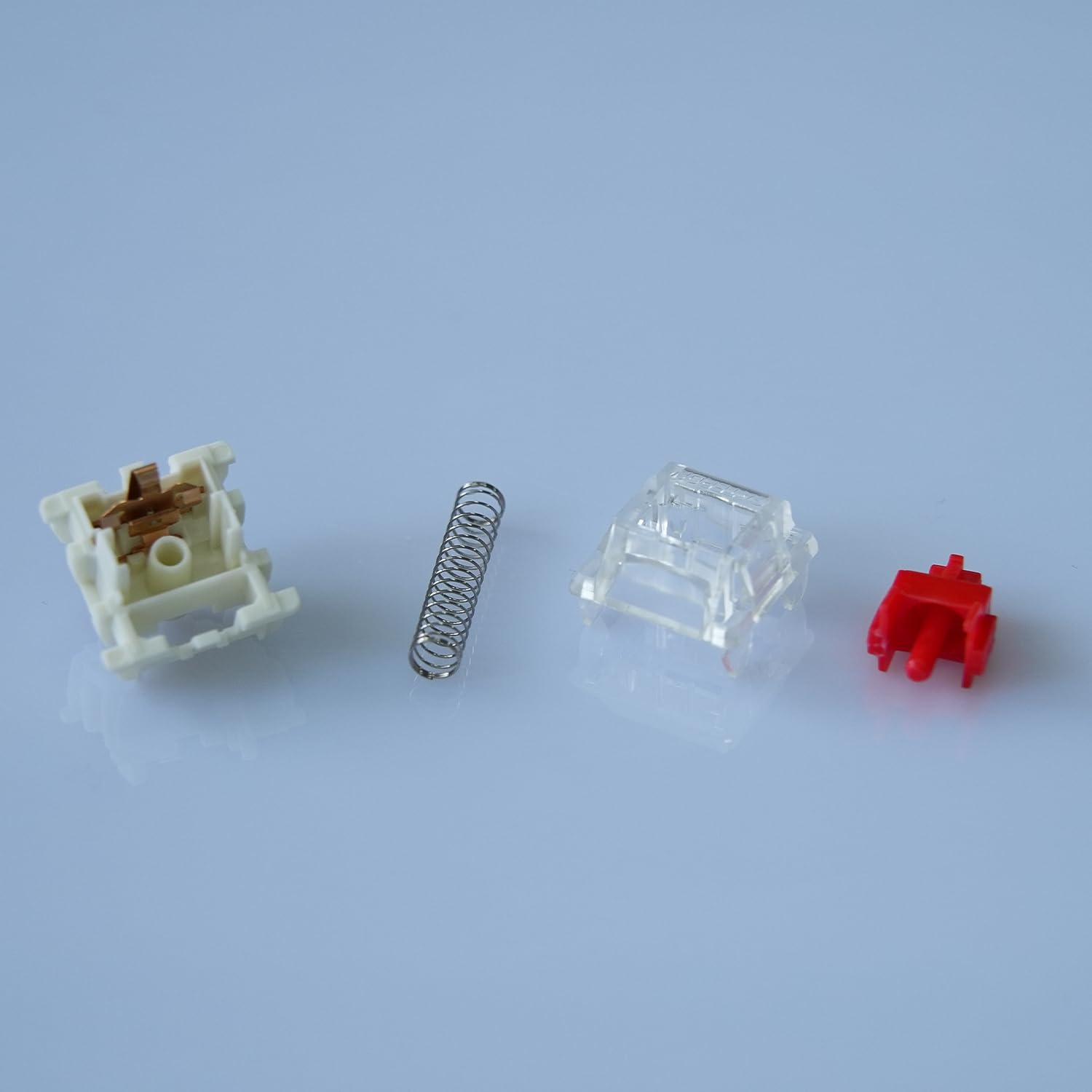
Mechanical switches have become a popular selection among both typists and gamers due to their unique characteristics that significantly enhance typing and gaming experiences. One of the primary advantages of mechanical switches is their tactile feedback. Unlike their membrane counterparts, mechanical switches provide a palpable response with each keystroke, allowing users to feel when a key is actuated. This tactile sensation can improve typing accuracy and speed, an essential factor for professionals who spend considerable time on their keyboards.
Durability is another noteworthy feature of mechanical switches. Generally constructed with high-quality materials, these switches can withstand millions of keystrokes before showing signs of wear and tear. For instance, Cherry MX switches are rated for 50 million keystrokes, offering longevity that is appealing to both gamers engaged in intensive sessions and typists who require consistent performance over time.
Customizability is a defining trait of mechanical keyboards, catering specifically to individual preferences. Users can select different types of mechanical switches based on their desired key feel and sound. Manufacturers like Razer have developed their own line of mechanical switches (such as Razer Green and Razer Yellow), which provide options tailored for gaming or for quieter typing environments. Another popular option is Gateron, known for its smooth key presses and affordability, allowing users to choose an ideal switch for their typing style and needs.
In addition to the switches themselves, many mechanical keyboards allow for further customization, such as programmable keys and RGB lighting, which enhances both aesthetics and functionality. As a result, mechanical switches stand out as the preferred choice for those looking for optimal performance, making them highly sought after in today’s market.
Factors to Consider When Choosing a Switch
When selecting a keyboard switch, it is essential to evaluate a variety of factors that significantly influence both typing comfort and gaming performance. The typing feel is perhaps the most critical element; it encompasses the tactile feedback a switch provides. Some users prefer a tactile response, while others may opt for a smooth typing experience. Understanding whether you enjoy the sensation of bumping into a tactile switch can help narrow down your options considerably.
Another vital factor is actuation force, which refers to the amount of pressure required to register a keypress. Light switches, for instance, can enhance typing speed as they require less effort to activate, making them preferred among gamers. Conversely, heavier switches may help to minimize accidental key presses, which can be beneficial for typists who prioritize precision over speed.
Key travel distance also plays a significant role in the performance of keyboard switches. This distance is measured from the point of actuation to the bottom of the key. Shorter travel distances can lead to faster typing speeds, whereas longer distances might keep your fingers comfortable during extended typing sessions. Balancing these distances according to personal preference ensures a tailored experience that can enhance both productivity and enjoyment.
The noise level of the switch cannot be overlooked either. Quiet switches are often favored in shared environments to avoid disturbing others. In contrast, some users might enjoy the auditory feedback from louder switches, finding it satisfying and confirming their keystrokes. Personal preference ultimately dictates the ideal noise level.
Lastly, individual preferences strongly influence the choice of switch. Some may prefer the distinct sound and feel of mechanical options, while others may lean towards the quieter and softer feel of membrane switches. Assessing these varied factors allows users to choose the best switch tailored to their typing habits and gaming styles.
Top Keyboard Switches for Typing
Choosing the right keyboard switch can significantly enhance your typing experience. The ideal switch is one that fits your typing style, offering comfort, speed, and ergonomics. Here, we explore some of the best keyboard switches known for their performance in typing applications.
One of the most favored switches for typing is the Cherry MX Brown. This switch is a tactile option that provides feedback without the noise associated with clicky switches. The actuation force is balanced, making it suitable for long typing sessions while reducing fatigue. Users appreciate the tactile bump that alerts them when a key is actuated, which can enhance typing speed.
Another excellent choice for those prioritizing a quiet typing experience is the Cherry MX Red switch. This switch is linear, which means no tactile feedback exists when the key is pressed. It requires a lower actuation force, ideal for rapid key presses often favored by typists who prioritize speed over tactile feedback. The smooth keypress offers a comfortable typing experience, minimizing wrist strain over extended usage.
For those who prefer a more audible response, the Razer Green switch is an attractive alternative. This switch is designed with a pronounced tactile bump and a satisfying click, making it an appealing choice for typists who enjoy an audio confirmation of each keystroke. Its resistance also contributes to reducing accidental key presses, which can be beneficial during intensive typing tasks.
Lastly, the Gateron Blue switch is recommended for users seeking a distinctive tactile and auditory feedback. Similar to the Razer Green, it offers a clicky feel that many typists find motivating. This switch is popular among writers and programmers who value both performance and a mechanical feel in their keyboards.
Top Keyboard Switches for Gaming

When it comes to gaming, the choice of keyboard switch can significantly impact performance and overall enjoyment. Gamers typically prioritize switches that provide rapid response times, durability, and features that enhance in-game actions. Among the myriad of switches available on the market, several have emerged as favorites among professional gamers due to their excellent performance characteristics.
One of the standout options for gaming is the Cherry MX Red switch, known for its smooth linear action and low actuation force. With a travel distance of 2mm for actuation and a total distance of 4mm, the Cherry MX Red allows for quick key presses, making it particularly appealing for fast-paced games that require rapid reflexes. Its quiet operation also ensures that gamers are not distracted by loud keystrokes during crucial moments.
Another popular choice is the Razer Green switch, featuring a tactile feedback mechanism. It is designed to provide a satisfying “click” sound upon actuation, which can enhance the typing experience for some users. The actuation force of the Razer Green switch is slightly heavier than that of the Cherry MX Red, adding an element of intentionality to each press. This tactile feedback can be advantageous in certain gaming scenarios where precise input is essential.
For those who prefer a hybrid experience, the Kailh Speed switches are another excellent option. Specifically engineered for gaming, these switches are optimized for quicker actuation and have a shorter travel distance compared to traditional mechanical switches. This makes them ideal for gamers looking to gain an edge in competitive environments.
Additionally, anti-ghosting features integrated into many modern gaming keyboards allow multiple keys to be pressed simultaneously without missing inputs. This functionality is crucial in many gaming situations where simultaneous commands are necessary. Selecting switches designed for gaming can significantly enhance the user experience, providing improved responsiveness and overall performance.
Testing and Personal Preferences
When it comes to selecting the best keyboard switch for typing and gaming, individual preferences have significant implications on overall experience and satisfaction. Each user has unique requirements, influenced by their typing style, gaming habits, and tactile preferences. Because of this, it is crucial to engage in direct testing of various keyboard switches before making a decision. Simply relying on reviews or descriptions may not fully capture the nuances that personal touch can reveal.
One effective approach is to visit local electronics stores where a range of mechanical keyboards are on display. Many retailers provide the option to test different models equipped with various switches. This hands-on experience allows potential buyers to gauge factors such as actuation force, travel distance, and tactile feedback. Each switch type, whether linear, tactile, or clicky, offers a distinctive feel that impacts typing speed and accuracy, as well as immersive gaming performance.
For those unable to access physical stores, purchasing sample packs from keyboard manufacturers can serve as a viable alternative. These packs often include several types of switches, enabling consumers to experiment at home. By trying out different switches across various activities—like typing documents, coding, or playing games—individuals can better discern which switch aligns with their specific needs. Observing how each switch interacts with personal preferences can lead to a more satisfying and tailored experience in both daily productivity and recreational activities.
Ultimately, the goal is to ensure that the keyboard switch complements one’s usage style, whether for intensive gaming sessions or long hours of typing. Through thoughtful testing and consideration of personal preferences, users can discover the perfect switch that meets their demands.
The Future of Keyboard Switch Technology
The landscape of keyboard switch technology is undergoing a significant transformation as manufacturers innovate to meet the diverse needs of users, particularly in typing and gaming. One prominent trend is the rise of optical switches, which utilize light-based actuation instead of the traditional mechanical-based methods. This technology offers advantages such as quicker response times and improved durability, making it increasingly popular among competitive gamers who demand both speed and reliability.
In addition to optical switches, advancements in wireless technology have become a focal point. Modern keyboards are now increasingly equipped with wireless capabilities, providing users with the convenience of a clutter-free workspace. Innovations such as low-latency Bluetooth connections are being developed to ensure that performance is not compromised. This shift towards wireless solutions allows for a more versatile typing experience while still catering to gamers who require precise and instant feedback.
The evolution of keyboard switch materials is another pivotal area of advancement. Manufacturers are exploring new composites that enhance the longevity and tactile feedback of switches. The shift to more sustainable materials is also gaining traction, as consumers increasingly prioritize eco-friendly products. This commitment to using advanced materials not only improves the performance of switches but also addresses broader environmental concerns.
Furthermore, customization options have expanded dramatically, allowing users to tailor their switches to suit personal preferences. From varying actuation distances to different tactile feedback, the ability to personalize keyboard switches represents the future of keyboard technology. As these trends continue to develop, it is evident that the future of keyboard switches will be characterized by improved functionality, enhanced user experiences, and a commitment to sustainability.
Conclusion and Final Recommendations

In the realm of computing, the choice of keyboard switch plays a fundamental role in enhancing both typing experience and gaming performance. As discussed, the various types of switches such as mechanical, membrane, and hybrid, exhibit distinct characteristics that cater to different user preferences—whether that be a tactile response, noise levels, or actuation speed.
For typists, switches that provide a tactile feedback, like the Cherry MX Blue or Brown switches, are often favored due to their comfortable typing feel. Such switches can enhance accuracy and reduce fatigue, making them suitable for long hours of writing or programming. Conversely, for gamers, speed and responsiveness are critical, making linear switches like the Cherry MX Red or Black a more appropriate choice. Their smooth action and minimal resistance allow for rapid key presses, greatly aiding in competitive scenarios.
It is also important to consider the weight of the switches, which varies amongst individuals. Light switches may work better for those who prefer quick and effortless keystrokes, while heavier switches may provide a more deliberate and controlled feel, appealing to different user experiences. Additionally, customizations available in the switch types can significantly affect one’s experience, with options for remapping keys and adjusting actuation points.
Ultimately, the choice of the best keyboard switch depends on individual priorities, whether one values a smooth typing experience or requires quick responses in gaming. It is advisable to test various switches, if possible, before making a decision. Understanding personal needs while considering the distinctions between the different switches can lead to a more satisfying keyboard experience.


