


Do you want typing to be easier? Keyboard suggestions help. They show words you might use next. This saves time. It also helps with spelling.
What are Keyboard Suggestions?
Keyboard suggestions are words that pop up. They appear as you type. This helps choose words faster. It is useful for many people. You can find it on phones and computers.
Why Use Keyboard Suggestions?
- Save time while typing.
- Find correct spelling quickly.
- Type full sentences faster.
- Reduce typing mistakes.
Turning on Keyboard Suggestions on Android
Let’s start with Android phones. Follow these steps:
- Open Settings on your phone.
- Scroll down and select “System”.
- Tap on “Languages & input”.
- Select “Virtual keyboard”.
- Choose your keyboard, like Gboard.
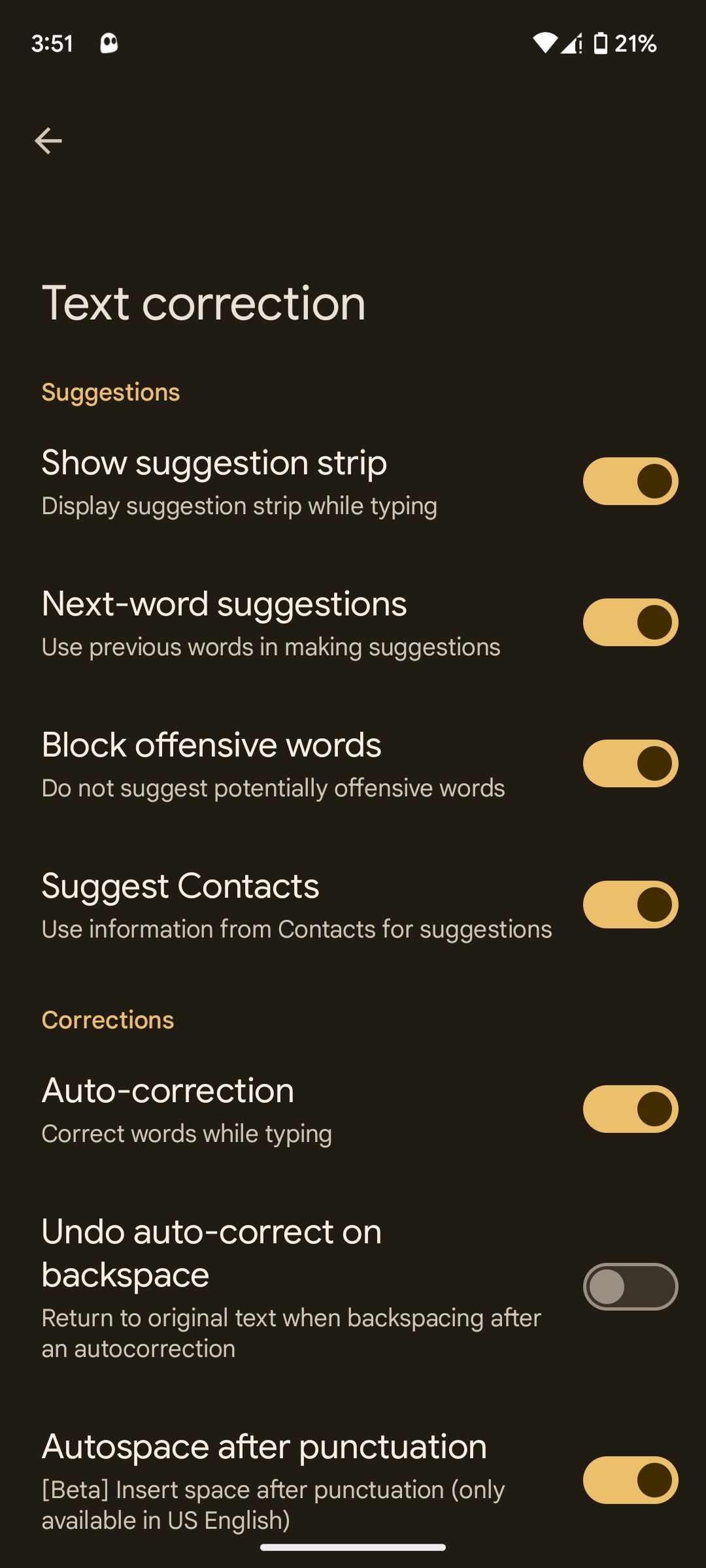
- Tap “Text correction”.
- Turn on “Show suggestion strip”.
Now, your keyboard will suggest words. Easy, right?
Turning on Keyboard Suggestions on iPhone
iPhone users, here are your steps:
- Open Settings on your iPhone.
- Tap “General”.
- Select “Keyboard”.
- Turn on “Predictive”.
Your iPhone will now suggest words. Enjoy typing faster!
Turning on Keyboard Suggestions on Windows
For Windows computers, follow these steps:
- Open Settings.
- Go to “Devices”.
- Select “Typing”.
- Turn on “Show text suggestions as I type”.
Your keyboard will now help with words. Typing made simple!
Turning on Keyboard Suggestions on Mac
Mac users can do this:
- Open “System Preferences”.
- Click on “Keyboard”.
- Select the “Text” tab.
- Check “Use text suggestions”.
Your Mac will now suggest words. Easy typing ahead!
Benefits of Keyboard Suggestions
Keyboard suggestions are helpful. They make typing faster. They help with spelling. They reduce errors. They work on many devices. Try it yourself!
Frequently Asked Questions
How Do I Enable Keyboard Suggestions?
Go to settings. Find language and input. Turn on keyboard suggestions.
Why Are Keyboard Suggestions Useful?
They save time. Suggest words. Improve typing accuracy. Make your work easier.
Can I Customize Keyboard Suggestions?
Yes, you can. Go to settings. Adjust preferences. Personalize suggestions to your liking.
Which Apps Support Keyboard Suggestions?
Most apps do. Messaging, email, notes. Check app settings for options.
Conclusion
Turning on keyboard suggestions is simple. It helps you type better. Follow the steps for your device. Enjoy faster and easier typing. Make fewer mistakes. Have fun typing!