


The best mechanical keyboard stabilizers in 2024 are the Durock V2 and the Cherry MX stabilizers. These options provide excellent performance and durability for an enhanced typing experience.
Mechanical keyboards are popular for their tactile feedback and customizability. Stabilizers play a crucial role in ensuring key stability and reducing noise. Choosing the right stabilizers can significantly improve your overall typing experience. In 2024, options like Durock V2 and Cherry MX stand out for their reliability and performance.
Users seek smooth, quiet keystrokes and minimal rattle. High-quality stabilizers enhance both gaming and typing experiences, making them essential for enthusiasts. This guide will explore the best stabilizers available, highlighting their features and benefits to help you make an informed choice for your keyboard setup.
Mechanical keyboard stabilizers play a crucial role in enhancing typing experience. They provide balance and support for larger keys. This includes the space bar, enter key, and shift key. Without stabilizers, these keys can wobble and produce unwanted noise.
Choosing the right stabilizers can improve your keyboard’s performance. They help in achieving a smooth and quiet typing experience. In 2024, various options are available, catering to different preferences. Let’s dive deeper into the role and evolution of these essential components.
The Role Of Stabilizers In Keyboards
Stabilizers serve multiple important functions:
- Support: They stabilize larger keys to prevent wobbling.
- Noise Reduction: Stabilizers absorb sound, making typing quieter.
- Durability: They help keys withstand repeated use without wear.
High-quality stabilizers enhance the overall feel of the keyboard. They ensure that every keystroke is consistent and satisfying. Users notice a significant difference when using stabilizers that fit well.
Evolution Of Stabilizers Through The Years
The design of stabilizers has improved significantly over time. Here’s a brief overview:
| Year | Type | Description |
|---|---|---|
| 1990s | Clip-in | Basic design, often made of plastic. |
| 2000s | Rail | Enhanced stability and reduced noise. |
| 2010s | Snap-in | Improved ease of installation and performance. |
| 2020s | Customizable | Allows users to modify for personal preference. |
Today, users can choose from a variety of stabilizers. Options include clip-in, screw-in, and snap-in designs. Each type has its unique benefits. The evolution continues to focus on enhancing user experience and performance.
Types Of Stabilizers
Stabilizers play a crucial role in keyboard performance. They help keep larger keys steady. Different types suit various preferences and needs. Here are the most popular types of stabilizers.
Cherry Style Stabilizers
Cherry style stabilizers are a favorite among gamers and typists. They are known for their reliability and smooth feel.
- Compatible with Cherry MX switches.
- Easy to install and remove.
- Provide minimal wobble during typing.
Many users prefer them for their quiet operation. They also come in different sizes for various key types.
Costar Stabilizers
Costar stabilizers offer a different design. They use clips for a secure fit. This style provides a unique typing experience.
- More complex installation process.
- Require additional tools for adjustments.
- Great for enthusiasts seeking customization.
Costar stabilizers can be louder than Cherry style. They are often chosen for their distinct feedback.
Optical And Magnetic Stabilizers
Optical and magnetic stabilizers are newer options. They use light or magnets for stabilization.
- Offer a unique feel and sound.
- Reduce key wobble significantly.
- Require specific PCB compatibility.
These stabilizers are ideal for tech-savvy users. They can enhance the keyboard’s overall performance.
| Type | Installation | Noise Level | Customization |
|---|---|---|---|
| Cherry Style | Easy | Low | Moderate |
| Costar | Complex | High | High |
| Optical/Magnetic | Moderate | Variable | High |
Key Features To Consider

Choosing the right mechanical keyboard stabilizers is essential for smooth typing. Focus on key features that enhance performance and comfort. Here are some important aspects to evaluate.
Material Quality
The material quality of stabilizers significantly impacts durability. Look for stabilizers made from high-grade plastic or rubber. These materials resist wear and tear over time.
- Plastic: Lightweight and durable, ideal for everyday use.
- Rubber: Offers better cushioning and noise dampening.
- Metal: Provides long-lasting stability but may increase weight.
Noise Reduction
Noise levels can affect your typing experience. High-quality stabilizers minimize noise during keystrokes. Consider the following features for effective noise reduction:
- O-rings: Add them for softer key presses.
- Lubrication: Apply grease or oil for smoother operation.
- Design: Choose stabilizers designed for silent operation.
Ease Of Installation
Installation should be straightforward and hassle-free. Complicated setups can frustrate users. Look for stabilizers with these characteristics:
| Feature | Description |
|---|---|
| Clip-in Design | Easy to install without soldering. |
| Compatibility | Works with various keyboard layouts. |
| Clear Instructions | Guides help users install stabilizers correctly. |
Check reviews for user experiences on installation. This helps find the best options.
Top Stabilizers For Gaming Keyboards
Choosing the right stabilizers can enhance your gaming experience. Good stabilizers improve key feel and reduce noise. They make each keystroke smooth and reliable.
Performance And Durability
Performance is crucial for gamers. Stabilizers must withstand fast-paced action. Here are some top picks for performance and durability:
| Stabilizer | Performance Rating | Durability |
|---|---|---|
| GMK Stabilizers | ⭐⭐⭐⭐⭐ | High |
| Durock V2 | ⭐⭐⭐⭐ | Medium |
| Everglide V2 | ⭐⭐⭐⭐⭐ | High |
Choose stabilizers that suit your gaming style. Look for options with low rattle and smooth action.
Compatibility With Keycap Profiles
Keycap compatibility is essential for a perfect fit. Different stabilizers work best with specific keycap profiles. Here’s a quick guide:
- Cherry Profile: Works with most stabilizers.
- SA Profile: Needs taller stabilizers for best performance.
- DSA Profile: Compatible with various stabilizers.
Check compatibility before buying. Proper fit ensures better performance and feel.
Preferred Stabilizers For Typists
Choosing the right stabilizers enhances the typing experience. Typists require precision and comfort. The best stabilizers provide stability and reduce noise. Here are some top choices for typists.
Precision And Stability
Precision matters for typists. Great stabilizers keep your keys steady. Here are popular options:
| Stabilizer | Precision Rating | Stability Features |
|---|---|---|
| GMK Stabilizers | High | Snap-in design, smooth key presses |
| Durock V2 | Very High | Polymer materials, tight fit |
| ZealPC Stabilizers | High | Lubed, minimal rattle |
These stabilizers ensure smooth and precise typing. They reduce unwanted noise and enhance overall performance.
Aesthetic And Customizability
Many typists enjoy a personal touch. Aesthetic stabilizers can match your keyboard theme. Here are some customizable options:
- Color Options: Available in various colors.
- Material Choices: Different materials for unique feels.
- Mounting Styles: Clip-in or screw-in styles.
Stabilizers like the Durock V2 come in different colors. This allows for a unique look. Customizing stabilizers enhances the keyboard’s visual appeal.
Choosing the right stabilizers enhances typing comfort and style. Make your keyboard reflect your personality!
Innovations In Stabilizer Technology
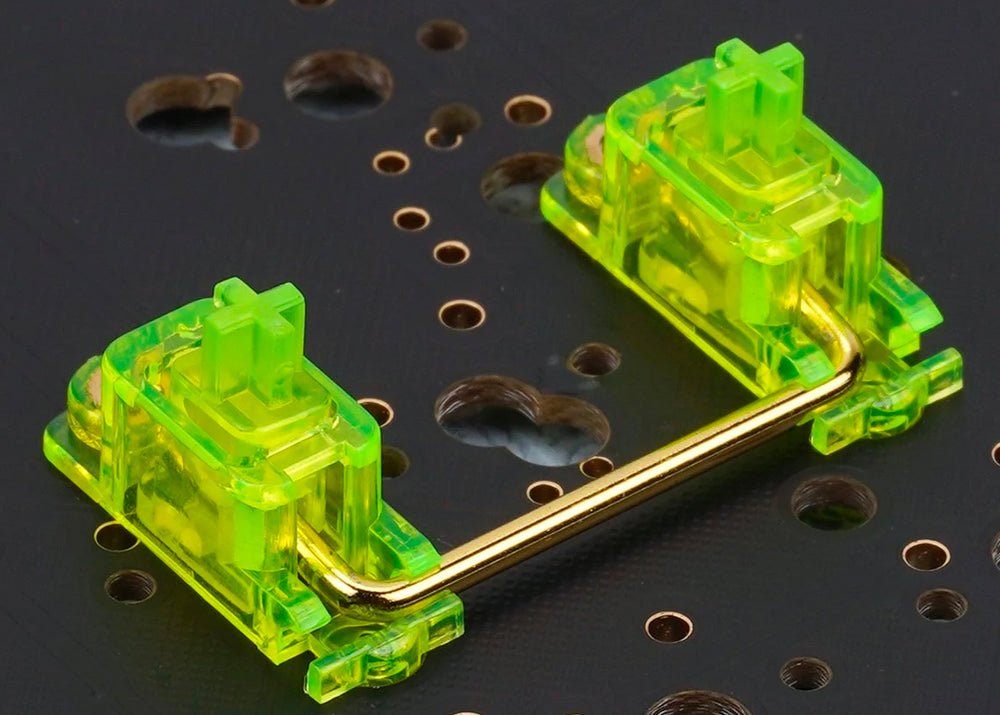
The mechanical keyboard market is evolving. New technologies enhance user experience. Stabilizers play a key role in this evolution. Innovations focus on sound, feel, and performance. Let’s explore the latest advancements.
Silencing Mods And Lubrication
Silencing mods are a game changer. They significantly reduce noise. Users enjoy quieter typing experiences. Key innovations include:
- O-Rings: These soft rings dampen keystrokes.
- Silicone Pads: These pads absorb sound and vibration.
Lubrication is essential for smooth operation. Properly lubed stabilizers enhance performance. Benefits of lubrication include:
- Less friction during key presses.
- Improved responsiveness.
- Extended lifespan of stabilizers.
Many users prefer DIY lubrication methods. Popular lubricants include:
- Dielectric Grease: Great for a silky feel.
- Lubing Kits: Tailored for mechanical keyboards.
Hot-swappable Designs
Hot-swappable designs offer flexibility. Users can change stabilizers easily. No soldering is required. This innovation caters to customization. Benefits include:
- Experiment with different stabilizers.
- Upgrade without technical skills.
- Personalize keyboard feel and sound.
Popular hot-swappable keyboards include:
| Keyboard Model | Stabilizer Type | Features |
|---|---|---|
| Keychron K6 | Gateron | Compact, RGB backlighting |
| Ducky One 2 Mini | Cherry MX | Customizable RGB, portable |
| Glorious GMMK | Glorious Panda | Fully modular, high-quality materials |
Hot-swappable designs empower users. Enjoy personalized typing experiences with ease. Innovations in stabilizer technology continue to enhance keyboards.
Installation Guide
Installing mechanical keyboard stabilizers can seem tricky. This guide simplifies the process. With the right tools and steps, you can enhance your keyboard’s performance. Let’s dive into the installation process.
Tools Required For Installation
- Keycap Puller: Safely remove keycaps.
- Screwdriver: Needed for disassembling the keyboard.
- Lubricant: Ensures smooth operation of stabilizers.
- Stabilizer Clips: Secure the stabilizers in place.
- Tweezers: Helpful for precise placement.
Step-by-step Installation Process
- Turn Off Your Keyboard: Always power down first.
- Remove Keycaps: Use the keycap puller to gently lift them off.
- Open the Case: Use a screwdriver to remove the screws.
- Take Out the PCB: Carefully lift the circuit board from the case.
- Remove Old Stabilizers: Gently pull them out with tweezers.
- Prepare New Stabilizers: Apply lubricant on the parts.
- Install Stabilizers: Push them firmly into place.
- Reassemble the PCB: Place it back into the keyboard case.
- Attach Keycaps: Press them down firmly until they click.
- Power On: Test your keyboard to ensure everything works.
Follow these steps carefully. Enjoy your smoother typing experience with new stabilizers!
Maintenance And Care
Proper maintenance and care extend the life of your mechanical keyboard stabilizers. Regular cleaning ensures optimal performance. Knowing when to replace them helps maintain quality and feel.
Cleaning Techniques
Cleaning your stabilizers is simple. Use the following techniques:
- Remove the keycaps gently.
- Use a soft brush to dust off debris.
- Wipe the stabilizers with a damp cloth.
- Apply isopropyl alcohol for stubborn grime.
- Dry completely before reassembling.
Keep your workspace tidy. A clean keyboard enhances the typing experience.
When To Replace Stabilizers
Stabilizers wear out over time. Here are signs that it’s time to replace them:
- Key wobble or instability.
- Unusual noises during typing.
- Physical damage, like cracks or breaks.
- Persistent sticking or resistance.
Regular checks help maintain the keyboard’s performance. Replacing stabilizers ensures a smooth typing experience.
User Reviews And Community Favorites
User reviews play a crucial role in choosing the best mechanical keyboard stabilizers. They provide real-world insights from users who have tested various products. Community favorites often emerge from these discussions, guiding new buyers towards reliable options.
Community Polls And Opinions
Many online forums and communities regularly conduct polls to find the best stabilizers. Here’s a snapshot of popular choices based on recent polls:
| Stabilizer Model | Community Rating | Key Features |
|---|---|---|
| Durock V2 | 9.5/10 |
|
| GMK Stabilizers | 9.0/10 |
|
| Cherry Stabilizers | 8.5/10 |
|
Expert Recommendations
Experts in the keyboard community frequently recommend specific stabilizers. Their insights are valuable for making informed choices.
- Durock V2 – Known for excellent noise dampening.
- GMK Stabilizers – Preferred for their smooth action.
- ZealPC Stabilizers – Highly praised for customization options.
Many users appreciate the feel and sound of these stabilizers. Reviews highlight their durability and performance. Choose wisely based on community feedback and expert advice.
Where To Buy And Pricing
Finding the right mechanical keyboard stabilizers involves knowing where to shop and understanding their prices. This guide will help you identify trusted retailers and online stores, along with their pricing structures.
Trusted Retailers And Online Stores
Many reliable places sell mechanical keyboard stabilizers. Here are some top options:
- Amazon: Offers a vast selection with user reviews.
- Newegg: Focuses on tech products and often has deals.
- MechanicalKeyboards.com: Specializes in keyboards and parts.
- eBay: Great for finding rare or used stabilizers.
- Micro Center: Offers in-store shopping for immediate needs.
Price Range And Value For Money
Prices for stabilizers can vary based on brand and type. Here’s a quick breakdown:
| Type of Stabilizer | Price Range | Value |
|---|---|---|
| Clip-in Stabilizers | $10 – $20 | Good for beginners |
| Screw-in Stabilizers | $15 – $30 | More stability and durability |
| Premium Stabilizers | $25 – $50 | High-end performance |
Consider the following points for value:
- Check user reviews for performance feedback.
- Look for bulk purchase discounts.
- Compare prices across different retailers.
Investing in quality stabilizers can enhance your typing experience. Make sure to choose a retailer that fits your needs.
Conclusion And Future Trends

The world of mechanical keyboard stabilizers is rapidly evolving. In 2024, innovations in design and materials improve performance and user experience. This section explores the best options and future trends in stabilizers.
Summing Up The Best Stabilizers
| Stabilizer Model | Key Features | Pros | Cons |
|---|---|---|---|
| GMK Stabilizers | Durable, noise-dampening | Excellent stability, easy installation | Higher price |
| Durock V2 | Customizable, smooth | Great for gaming, low noise | Requires lubing |
| Cherry MX Stabilizers | Classic design, reliable | Widely available, good quality | Can be noisy |
| Everglide Stabilizers | High-quality materials | Great performance, durable | Limited availability |
Each stabilizer offers unique features. Choose one based on your needs. Consider your typing style and preferences.
What’s Next For Keyboard Stabilizers?
- Smart Technology: Future stabilizers may include smart features.
- Customization: Expect more options for personalizing stabilizers.
- Eco-friendly Materials: Manufacturers are exploring sustainable materials.
- Enhanced Sound Dampening: Quieter stabilizers will improve typing experience.
These trends indicate an exciting future for keyboard enthusiasts. Innovations will enhance performance and user comfort. Stay tuned for more developments in this space!
Frequently Asked Questions
What Are Mechanical Keyboard Stabilizers?
Mechanical keyboard stabilizers are components that support larger keys, like the spacebar and enter key. They prevent wobbling and enhance typing experience. Quality stabilizers reduce noise and improve key press feel. Choosing the right stabilizers can significantly elevate your typing comfort and accuracy.
How To Choose The Best Stabilizers?
Choosing the best stabilizers involves considering key size and typing style. Look for stabilizers that match your keyboard layout. Evaluate the materials used for durability and noise level. Popular options include Cherry, Durock, and GMK stabilizers. Reading user reviews can also help you make an informed decision.
Are Stabilizers Easy To Install?
Yes, stabilizers are generally easy to install. They usually snap into place on the keyboard plate. Some may require soldering, depending on your keyboard type. Many tutorials are available online to guide you through the process. Ensuring proper installation is crucial for optimal performance.
Do Stabilizers Affect Typing Sound?
Absolutely, stabilizers can impact typing sound. Quality stabilizers are designed to minimize noise during key presses. Lubrication can further enhance sound dampening. The material of the stabilizers also plays a role in the overall sound profile. Investing in good stabilizers can lead to a quieter typing experience.
Conclusion
Choosing the right stabilizers can enhance your typing experience significantly. The best mechanical keyboard stabilizers of 2024 offer improved performance and comfort. Upgrade your setup today for a smoother and quieter keystroke. With so many options available, finding the perfect fit for your needs is easier than ever.
Happy typing!


