


First-Person Shooter (FPS) gaming is a genre that immerses players in a virtual world where quick reflexes and precise aiming can determine the outcome of a match. In these fast-paced environments, players often face opponents in intense, action-packed scenarios where every millisecond counts. As such, the choice of gaming peripherals, particularly the mouse, plays a vital role in enhancing a player’s performance and overall gaming experience.
The mouse is not merely a tool for interaction; it is an extension of the player’s intent. A good mouse for FPS gaming incorporates features that cater to the specific requirements of this genre, such as high precision, rapid responsiveness, and comfortable ergonomics. FPS players frequently depend on swift movements and accurate targeting, which means that having the right mouse can significantly influence control during gameplay. The sensitivity settings of a gaming mouse, often measured in DPI (dots per inch), are crucial, offering gamers the ability to swiftly adjust their aim based on the pace of the game or the distance required for their shots.
Moreover, the performance factors such as polling rate, which measures how often the mouse reports its position to the computer, can enhance a player’s ability to react promptly during critical moments. A higher polling rate ensures smoother tracking and less lag, which is essential when executing rapid movements or aiming at fast-moving targets. Therefore, the right mouse not only enhances performance but also contributes to a more enjoyable and engaging FPS gaming experience. In summary, understanding the essential features of a gaming mouse can empower players to make informed choices that elevate their skills and effectiveness in competitive gameplay.
Key Features of a Good FPS Mouse
When evaluating a good mouse for first-person shooter (FPS) games, there are several essential features to consider that directly impact gameplay performance. These features include sensitivity (DPI), polling rate, weight, size, and shape, each contributing to a player’s ability to aim accurately and react swiftly.
Sensitivity, often measured in dots per inch (DPI), is crucial as it determines how far the cursor moves on the screen in relation to the physical movement of the mouse. Higher DPI settings allow for more rapid movements and adjustments during gameplay, which is particularly beneficial in fast-paced FPS scenarios. However, it is vital to choose a DPI that aligns with personal preference and control for optimal precision.
The polling rate, expressed in Hertz (Hz), refers to the frequency with which the mouse reports its position to the computer. A higher polling rate, such as 1000 Hz, reduces input lag significantly, ensuring that every movement is registered quickly and accurately. This aspect is especially important in the highly competitive FPS environment where milliseconds can dictate the outcome of a battle.
Weight is another factor to consider, as it affects the mouse’s maneuverability. Lightweight mice can facilitate quick movements, while heavier options may provide stability and control during lengthy sessions. Ultimately, the ideal weight varies based on personal preference, with some players opting for customizable weights to achieve their desired balance.
Size and shape are also critical for comfort and performance. A proper fit ensures a natural grip, reducing fatigue during extended gaming sessions. Mice come in various shapes, from ergonomic designs to ambidextrous models, catering to different hand sizes and grip styles. Finding the right combination of size and shape can enhance precision and comfort, allowing players to maintain peak performance in FPS games.
DPI and Sensitivity Explained
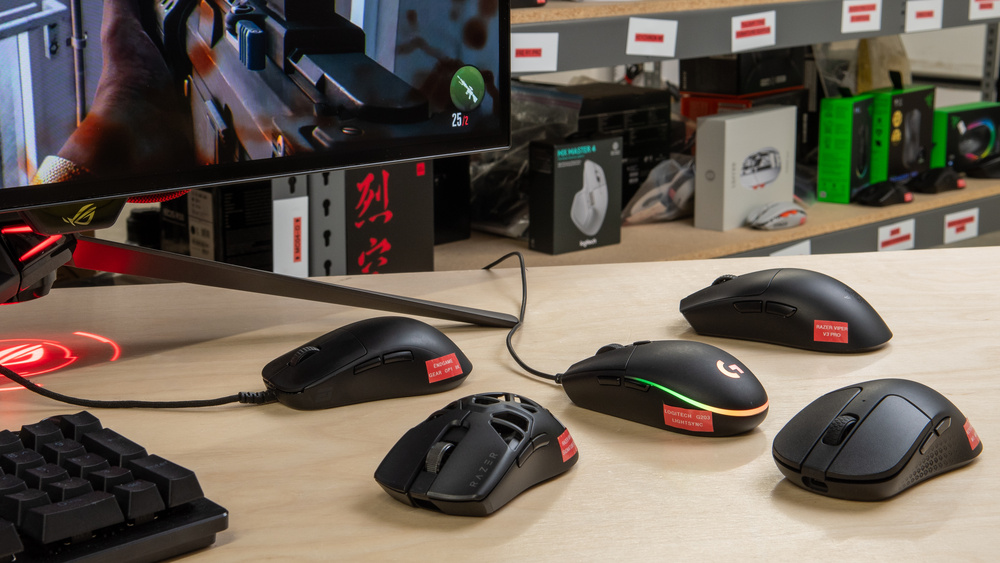
DPI, or dots per inch, is a crucial measurement that determines how far the cursor moves on the screen relative to the physical movement of the mouse. In the realm of first-person shooter (FPS) games, understanding DPI and sensitivity is vital for achieving precision and responsiveness during gameplay. A mouse with adjustable DPI settings allows players to customize the speed of their cursor, which can significantly affect their performance in fast-paced scenarios.
When discussing DPI settings, players often encounter a range of values, typically spanning from 400 to over 16,000 DPI. A lower DPI means that small, deliberate movements will result in a corresponding small movement of the cursor on the screen. This can be advantageous for tasks requiring high accuracy, such as aiming at distant targets. Conversely, a higher DPI setting accelerates cursor movement with less physical motion, catering to those who prefer swifter maneuvers.
One of the key considerations is the relationship between a player’s DPI and their in-game sensitivity settings. While higher DPI can enhance speed, it may compromise precision, particularly in FPS gaming where accurate shot placement is essential. Many professional gamers opt for lower DPI settings, often around 400 to 800, coupled with higher in-game sensitivity to strike a balance between speed and accuracy.
However, there are pros and cons to both high and low DPI settings. High DPI settings may benefit gamers who rely on quick reflexes, enabling rapid cursor movement across large screen distances. On the other hand, low DPI settings foster a steadier hand and greater control in precision shooting. Ultimately, finding the right DPI configuration is a personal journey and may vary based on a player’s style, preferences, and the specific FPS game being played.
Importance of Polling Rate
The polling rate is a critical specification when evaluating a gaming mouse, especially for players engaged in first-person shooters (FPS). Defined as the frequency with which the mouse reports its position to the computer, it is measured in hertz (Hz). Essentially, a higher polling rate means that the mouse communicates its location more frequently, leading to a more fluid and responsive gaming experience.
For instance, a mouse with a polling rate of 125Hz reports its position every 8 milliseconds, while a 1000Hz mouse does so every 1 millisecond. This difference may seem marginal, but in the fast-paced world of competitive gaming, it can make a significant impact on performance. When every millisecond counts, a higher polling rate ensures that actions such as aiming and shooting are executed with precision and minimal latency.
This increased responsiveness is essential in FPS games, where players often find themselves in high-stakes combat situations requiring quick reflexes and accurate movements. A mouse with a lower polling rate could result in noticeable delays between a player’s input and the on-screen actions, potentially leading to missed shots or tactical disadvantages. Therefore, many professional gamers and enthusiasts opt for mice with a high polling rate, as they facilitate better control and a smoother gameplay experience.
Furthermore, it’s important to consider that while a higher polling rate enhances performance, it also necessitates a robust computer system capable of processing the increased data flow. However, for serious gamers, the investment in a high-quality mouse with an optimized polling rate is justified, as it translates into a competitive edge in high-intensity gaming scenarios.
Ergonomics and Comfort

When selecting a mouse specifically for first-person shooter (FPS) gaming, the ergonomic design and overall comfort are crucial factors that significantly affect performance during prolonged gaming sessions. A well-designed mouse can greatly enhance a player’s ability to maneuver and react efficiently in fast-paced environments. Players may not realize that discomfort from holding an ill-fitted mouse can lead to fatigue, reduced concentration, and potentially hinder performance in critical moments.
There are various mouse shapes and sizes available in the market, each catering to different grip styles. The most common grip styles include palm, claw, and fingertip, and understanding how these grips affect mouse selection is essential. For instance, the palm grip is suited for larger gaming mice that provide supportive arches, allowing the user’s palm to rest comfortably while maintaining control for extended periods. In contrast, claw grip users may prefer a slimmer mouse that offers nimbleness for quick, precise movements.
Additionally, the size of the mouse can significantly impact comfort. A larger hand may struggle with a compact mouse, leading to increased strain on the wrist and fingers. Conversely, a small mouse may not support larger hands adequately, resulting in uncomfortable claw grips or wrist fatigue. Each player should assess their hand size and grip style when choosing a mouse to ensure a comfortable fit.
A mouse designed with ergonomics in mind will often feature contours or grooves that align with the natural curves of the hand, reducing pressure points and enhancing support. Many gaming mice also include customizable weights and adjustable features to cater to individual preferences. Making an informed choice based on ergonomics can lead to a better gaming experience, improved accuracy, and increased endurance, allowing players to focus on their skills and strategy rather than discomfort.
Weight and Balance Considerations
When it comes to first-person shooter (FPS) games, the weight and balance of a mouse play crucial roles in determining a player’s performance. A mouse that feels too heavy can lead to fatigue during extended gaming sessions, while one that is too light may compromise control and precision, especially during quick movements that demand accuracy. Therefore, it is essential for gamers to consider the specific weight of their mouse as it directly influences overall agility and comfort.
Many modern gaming mice come with adjustable weights, allowing players to tailor their devices to their preferred specifications. This feature not only enables users to find the optimal weight that complements their playing style but also aids in achieving the right balance. A well-balanced mouse promotes stability, making it easier to execute swift actions such as flick shots or snap aiming. By adjusting the weight distribution, players can enhance their maneuverability, ensuring that their mouse glides smoothly over the mousepad without excessive resistance or drag.
The significance of weight and balance goes beyond personal preference; it affects how responsive the mouse feels in various gaming situations. A heavier mouse might provide a sense of groundedness and can enhance precision in slow, deliberate movements, whereas a lighter option might excel in fast-paced scenarios where speed is essential. Gamers often experiment with different weights and shapes to identify which combination offers the perfect blend of control and comfort while engaging in intense FPS gameplay.
Ultimately, finding a mouse with optimal weight and balance can significantly enhance gaming performance, allowing players to respond quickly and efficiently during competitive matches. Hence, exploring options with these customizable features can provide a distinct advantage in the fast and demanding FPS environment.
Customization and Software Features
In the competitive world of first-person shooter (FPS) gaming, having a mouse that can be tailored to meet individual preferences is critical for optimal performance. Many modern gaming mice come equipped with a variety of customization options and software features that can significantly enhance gameplay. One of the most prominent features is the ability to program buttons to perform specific functions. This allows gamers to execute complex actions, such as quick weapon swaps or advanced maneuvers, with simple button presses, thus improving reaction times in fast-paced environments.
Another valuable aspect of customization is the adjustment of sensitivity settings, often referred to as DPI (dots per inch). High-quality gaming mice typically allow users to customize DPI levels via software, enabling quick changes on-the-fly during gameplay. For FPS gamers, this means the ability to switch from a lower sensitivity for precision aiming, to a higher sensitivity for fast movements, all without the need to pause the game.
Additionally, many gaming mice now have companion software that provides further customization capabilities. Through this software, users can create profiles for different games, adjusting the settings for sensitivity, polling rates, and button assignments according to the unique requirements of each game. Some mice even support macros, which are sequences of commands that can be executed with a single button press, allowing for complex actions to be performed effortlessly. This can be especially beneficial in FPS games, where executing multiple actions quickly can give players a tactical advantage.
The collective impact of these customization options and software features cannot be overstated. They not only enhance user comfort and efficiency but also allow gamers to personalize their setup to fit their unique play styles, ultimately improving their overall gaming experience.
Top Mouse Recommendations for FPS Gaming

When selecting the ideal mouse for first-person shooter (FPS) gaming, several options stand out due to their performance, ergonomics, and advanced features. Below are some top recommendations that have garnered positive attention from both gamers and experts alike.
1. Logitech G Pro X Superlight – Renowned for its lightweight design, the Logitech G Pro X Superlight weighs just 63 grams, making it one of the most agile choices for competitive play. With a HERO 25K sensor, it offers exceptional precision with a DPI range of 100 to 25,600, ensuring quick response times and accuracy in fast-paced games. User reviews often highlight its comfortable grip and reliable wireless performance.
2. Razer DeathAdder V2 – The Razer DeathAdder V2 is celebrated for its ergonomic shape that fits comfortably in the hand, ideal for long gaming sessions. Featuring Razer’s Optical Focus+ sensor with a DPI of up to 20,000, it provides excellent tracking capability. This mouse also boasts Razer’s Speedflex cable, promoting minimal drag for seamless movements. Many users appreciate its customizable RGB lighting and durable build quality.
3. SteelSeries Rival 600 – Combining dual-sensor technology, the SteelSeries Rival 600 features a TrueMove3+ sensor for precise tracking, alongside a dedicated depth sensor that detects lift-off distance. It allows for customization with its adjustable weight system, giving gamers the option to optimize their experience. Reviews frequently commend its exceptional performance in critical gaming scenarios.
4. Zowie EC Series – The Zowie EC Series mice are lauded for their simple, ergonomic design and driver-free usage, making them accessible for gamers who prefer a plug-and-play experience. With a DPI range adaptable to individual preferences, these mice are often highlighted in discussions about reliable performance in competitive FPS matches.
These top mouse recommendations for FPS gaming represent a blend of innovative technology and user-friendly designs, catering to the diverse needs of players. Their proven track records in gameplay performance reinforce their positions as top contenders in the gaming peripheral market.
Conclusion: Finding the Right Mouse for Your Play Style
Choosing the right mouse for First Person Shooter (FPS) games is a critical decision that can significantly impact your performance and overall gaming experience. Each player has a unique play style, and understanding how to select a mouse that aligns with your preferences is essential. The ideal mouse should not only cater to your ergonomic needs but also enhance your gameplay through the right sensitivity, weight, and customizable features.
Different gamers prioritize various aspects depending on their play style. For instance, competitive gamers may opt for a lightweight model with a high DPI (dots per inch), enabling quick movements and precision aiming during intense matches. This adaptability ensures that your mouse can keep pace with the rapid actions often required in FPS games. Conversely, players who favor a more strategic and calculated approach might prefer a heavier mouse that offers greater control, as it can provide stability when making fine adjustments.
Furthermore, the shape of the mouse plays a crucial role in long-term comfort. An ergonomic design can prevent strain during extended gaming sessions, while additional programmable buttons can offer tactical advantages. It is also beneficial to trial different designs to determine which fits your hand comfortably and allows optimal finger placement.
Ultimately, investing the time to evaluate your gaming habits, preferences, and the specific requirements of your favored FPS titles can lead to an informed decision. By selecting a mouse that resonates with your style, you can enhance not only your gameplay experience but also your overall satisfaction with your setup. Take the time to explore various options within the market, and choose a mouse that fits your unique gaming identity.


